2 QDA Data — Characterisation of the Sensory Space
2.1 Introduction
This analysis is designed for QDA (Quantitative Descriptive Analysis) data, when several subjects evaluate several stimuli using a fixed list of sensory attributes. It answers two complementary questions: which attributes structure the sensory space as a whole and which attributes characterise each stimulus in particular. More specifically, the function returns two families of results: a ranked list of the attributes that differentiate the set of stimuli, then, for each stimulus, a list of the attributes that characterise it.
Why not use a standard alternative?
A simple comparison of means by stimulus can be misleading if subjects do not all use the rating scale in the same way. Here, the analysis takes into account both the product effect (Stimulus Effect) and the subject effect (Subject Effect), which makes it possible to identify discriminating attributes and profiles more robustly than with a purely descriptive reading.
To test this function, simply load the sensochoc data available with the SEDA module — they appear in the list of example datasets when opening a new file in jamovi.
2.2 Understanding what happens under the hood
2.2.1 Data checking and preparation
The analysis first checks that the variable placed in the Stimulus Effect field and the variable placed in the Subject Effect field can be treated as factors, and that all variables placed in Sensory Attributes are numeric. If a sensory attribute is not numeric, the analysis stops with an error message.
2.2.2 An attribute-by-attribute analysis
A simple way to understand the computation is to say that the function proceeds attribute by attribute using an analysis of variance (ANOVA). For each variable in Sensory Attributes, it first evaluates whether the product effect is significant, while taking the subject effect into account. This first step acts as a global filter: it determines which attributes truly structure the sensory space.
2.2.3 Selection of discriminating attributes
Attributes whose significance is below the threshold defined by Significance threshold (%) are retained in the first results table. The default threshold is 5%, which makes it a good starting point for a cautious reading. If no attribute passes this threshold, the function stops and indicates that no sensory attribute is discriminating at the selected threshold.
2.2.4 Stimulus-by-stimulus description
Once the globally discriminating attributes have been identified, the function examines, for each stimulus, which attributes significantly characterise it. Each stimulus is compared with a global reference, which makes it possible to identify attributes positively or negatively associated with that stimulus. The global reference corresponds to the mean of the stimuli on each attribute, that is, the average stimulus. The result takes the form of a second table grouped by stimulus.
2.2.5 The role of adjusted means
The Adjusted mean column can be understood as an estimate of the stimulus mean on an attribute, corrected for the subject effect. This column makes it possible to read the perceived level of a stimulus without being limited to a raw mean that may be influenced by subjects who are more “generous” or more “severe” in their ratings.
When the tasting design is complete, that is, when each subject evaluates all stimuli, the adjusted mean is equal to the arithmetic mean. It differs from it when data are missing; in that case, the adjusted mean is more reliable.
2.2.6 What it means when a stimulus is absent from the second table, Sensory Description of the Stimuli
A stimulus may not appear in the second table if no attribute significantly characterises it at the chosen threshold. This does not mean that it has “no profile”, but rather that it does not differ clearly enough from the mean of the full set of stimuli on the tested attributes.
2.3 Expected data structure
The data must contain:
- one column identifying the stimuli;
- one column identifying the subjects;
- several numeric columns corresponding to the sensory attributes.
Each row corresponds to the evaluation of one stimulus by one subject. If subjects evaluate the stimuli over several repetitions or several sessions, each evaluation must appear on a separate row.
Before running the analysis in jamovi, check in the Data tab that:
- the variable intended for Stimulus Effect is categorical;
- the variable intended for Subject Effect is categorical;
- all variables intended for Sensory Attributes are numeric.
2.4 Interface guide
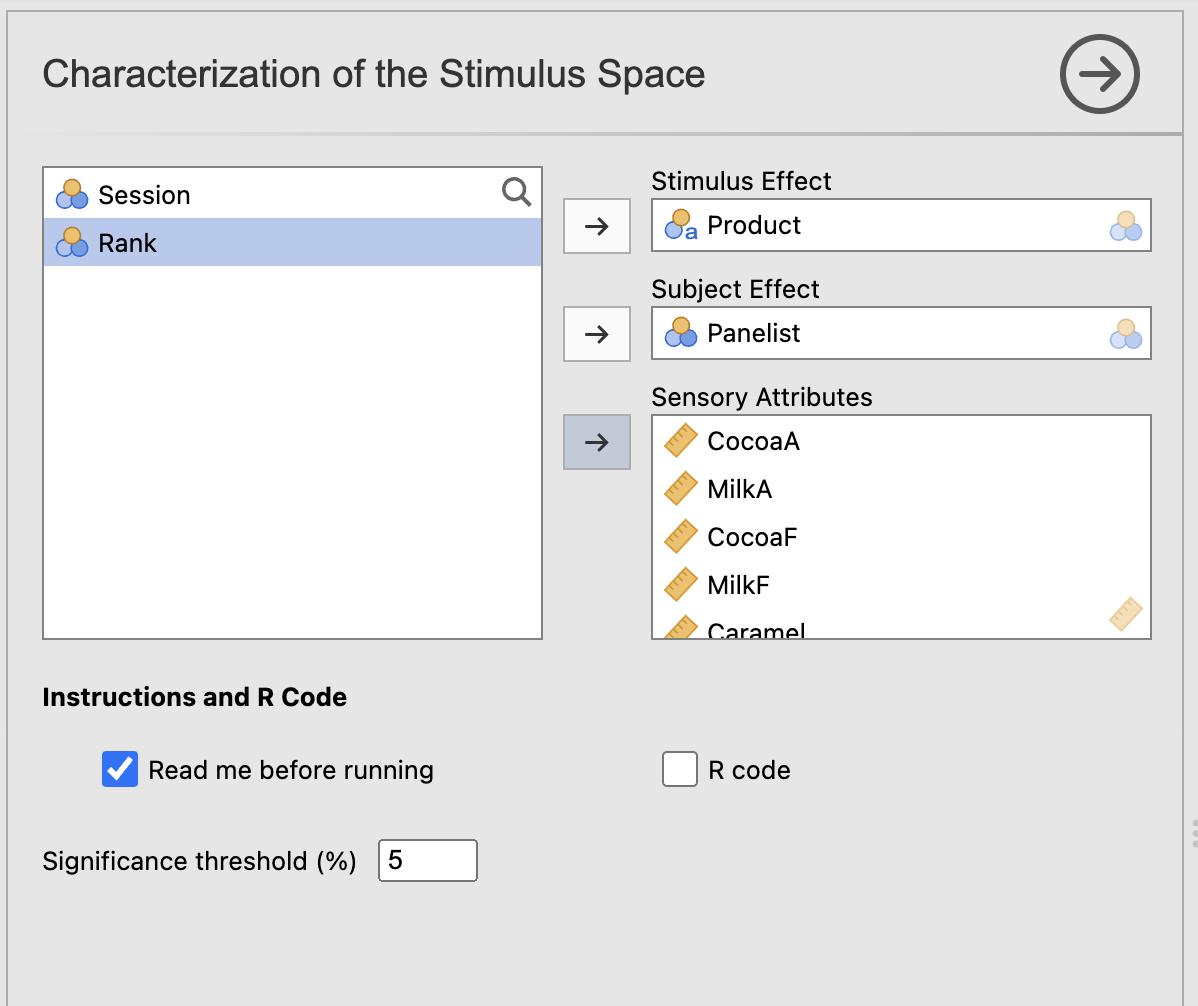
The analysis appears in the menu SEDA > Fixed List of Attributes > Characterization of the Stimulus Space. The interface includes three variable drop zones, an Instructions and R Code section containing the Read me before running and R code checkboxes, and a numeric field, Significance threshold (%).
2.4.1 Variables to complete
2.4.1.1 Stimulus Effect
Role: identifies the stimuli/products to compare. Impact on the computation: this variable defines the groups studied in the global analysis and in the stimulus-by-stimulus description. Practical tip: use explicit labels, because they directly structure the reading of the second table.
2.4.1.2 Subject Effect
Role: identifies the subjects. Impact on the computation: this variable is used to take systematic differences between subjects into account when estimating stimulus effects. Practical tip: check that the same subject keeps exactly the same identifier throughout the file.
2.4.1.3 Sensory Attributes
Role: groups together the sensory attributes to be analysed. Impact on the computation: the function applies the same analysis logic to each of these attributes; only numeric attributes are accepted. Practical tip: include all relevant attributes from your QDA; the statistical selection will then be performed through Significance threshold (%).
2.4.2 Instructions and R Code
2.4.2.1 Read me before running
Role: displays integrated help in the results. Impact on the computation: none. Practical tip: leave it checked during the first uses. It is enabled by default.
2.4.2.2 R code
Role: displays the R script corresponding to the analysis in an R Code output. Impact on the computation: none. Practical tip: enable this option if you want to reproduce the analysis in the jamovi Rj Editor or continue working in R. It is disabled by default.
2.4.3 Significance threshold: Significance threshold (%)
Role: sets the p-value threshold used to select discriminating attributes and the attributes characteristic of each stimulus. Impact on the computation: this threshold controls both which attributes appear in Identification of the Sensory Dimensions (global test) and which attributes appear in Sensory Description of the Stimuli (stimulus-level tests). A low threshold produces more conservative results; a higher threshold retains more attributes in both tables. Practical tip: the default value is 5%, a good starting point for a first trial. If the results are too sparse, try 10%, then possibly 20% for exploratory work.
2.5 Step-by-step procedure
- Open your dataset in jamovi.
- In the Data tab, check that the stimulus variable is categorical, that the subject variable is categorical, and that the sensory attributes are numeric.
- Open SEDA > Fixed List of Attributes > Characterization of the Stimulus Space.
- Place the stimulus variable in Stimulus Effect.
- Place the subject variable in Subject Effect.
- Place all sensory attributes in Sensory Attributes.
- Leave Significance threshold (%) at 5% for a first trial.
- First read Identification of the Sensory Dimensions to identify the attributes that structure the sensory space.
- Then read Sensory Description of the Stimuli to understand the characteristics specific to each stimulus.
- If no results appear, or if the second table is very sparse, test a slightly broader threshold.
2.6 Interpretation of results
2.6.1 Identification of the Sensory Dimensions
This first table lists the sensory attributes that significantly discriminate the stimuli, sorted from the most discriminating to the least discriminating. It is the entry point for interpretation: it indicates which attributes structure the sensory space as a whole.
| Element | Meaning |
|---|---|
| (first column) | Discriminating sensory attribute |
| Vtest | Standardised measure of the discriminating effect — the higher the value, the stronger the signal |
| p | P-value of the global test — the lower it is, the more clearly the attribute differentiates the stimuli |
The first rows of the table correspond to the most structuring attributes.
Point of vigilance: an attribute absent from this table is not sufficiently discriminating at the chosen threshold. If no attribute is retained, the function displays an error message and does not produce interpretable results.
2.6.2 Sensory Description of the Stimuli
This second table describes each stimulus through the attributes that significantly characterise it. Rows are grouped by stimulus, and the most salient attributes appear first within each group.
| Element | Meaning |
|---|---|
| (first column) | Name of the stimulus |
| Descriptor | Characteristic sensory attribute |
| Coefficient | Estimated deviation from the global reference — positive if the stimulus is perceived more intensely, negative otherwise |
| Adjusted mean | Adjusted mean of the stimulus on this attribute, corrected for the subject effect |
| p | P-value of the characterisation test |
| Vtest | Standardised intensity of the association — positive = over-represented, negative = under-represented |
- A positive V-test suggests that the stimulus is perceived as more intense than the reference, that is, the mean, on this attribute.
- A negative V-test suggests the opposite — and is just as informative.
- Use Adjusted mean to read the sensory level, but never interpret it without p and Vtest.
Point of vigilance: a stimulus absent from the table does not have “no profile”; it is simply not significantly different from the mean of the full set of stimuli at the chosen threshold.
In the current configuration of the function, no graphical output is produced. Interpretation is based entirely on the two result tables.
2.7 Example: the sensochoc dataset
The sensochoc dataset describes 6 chocolates evaluated by 29 subjects on 14 sensory attributes. It is used to illustrate the function outputs. The numerical values discussed below come directly from the analysis results. To load this dataset, open jamovi, click the icon in the top left corner, the three stacked lines, then Open → Data Library → SEDA.
2.7.1 Example settings
To reproduce this example, use the following values.
| Option | Value |
|---|---|
| Stimulus Effect | Product |
| Subject Effect | Panelist |
| Sensory Attributes | all numeric sensory attributes |
| Significance threshold (%) | 5 |
Figure 2.1 shows the configuration used for the sensochoc example.
2.7.2 Analysis of the Identification of the Sensory Dimensions table
With these settings, all 14 attributes emerge as discriminating at the 5% threshold. The table is sorted by decreasing V-test: the attributes at the top are those that most clearly differentiate the chocolates from one another. MilkF comes first (V-test = 16.40), followed by CocoaF (13.48) and Bitterness (13.34). At the bottom of the table, Sticky (V-test = 3.56) and Granular (4.37) are significant but less structuring. This ranking provides a first reading of the sensory space: the contrasts between chocolates are based above all on milky, cocoa, and bitter dimensions.
2.7.3 Analysis of the Sensory Description of the Stimuli table
Figure 2.2 illustrates the stimulus description table.
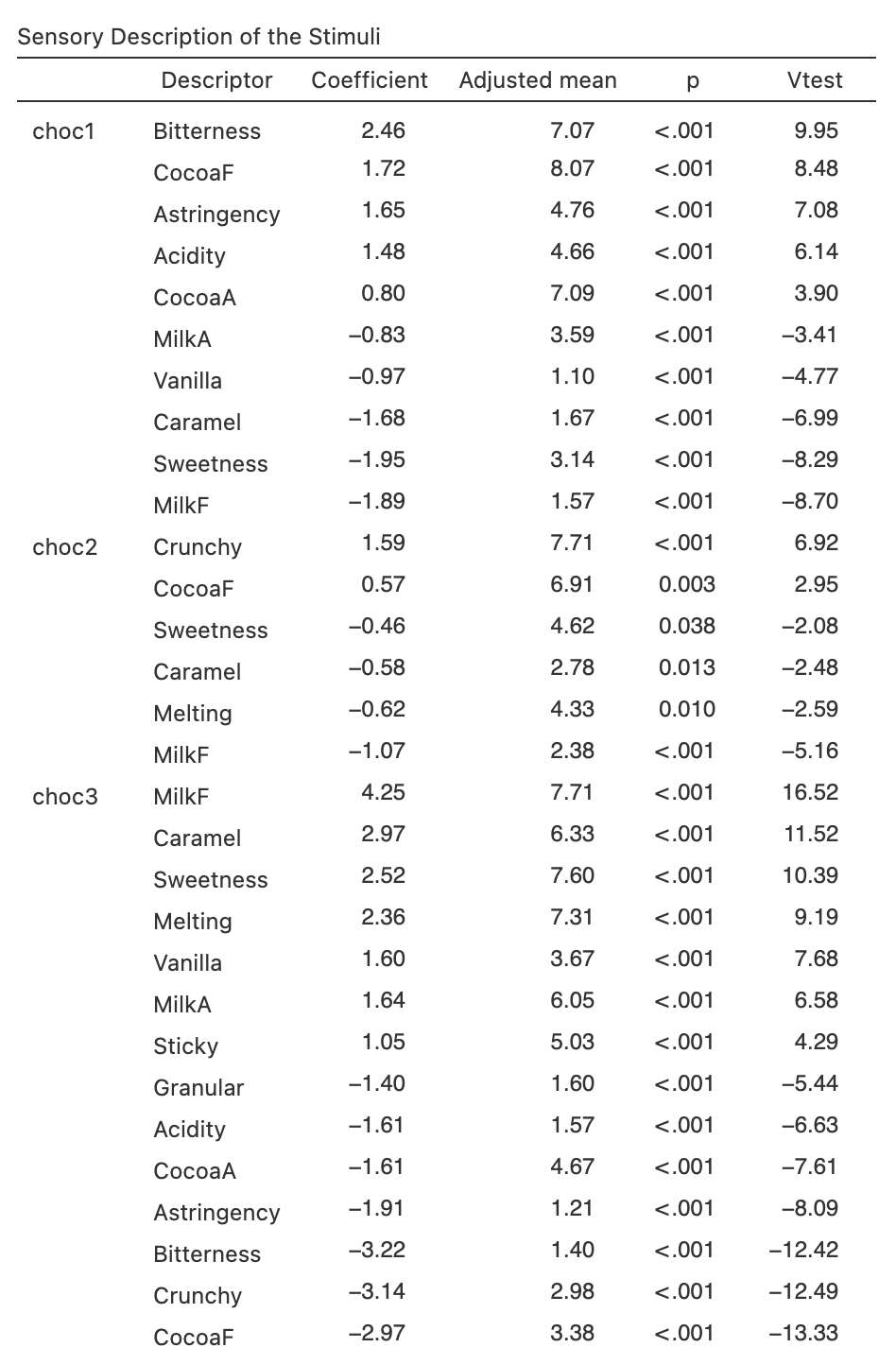
The second table makes it possible to read the profile of each chocolate relative to the overall mean of all six chocolates.
choc1 is characterised by a highly contrasted profile. For this chocolate, on the positive side, Bitterness has the highest V-test (9.95, coefficient +2.46) and an adjusted mean of 7.07, clearly above the overall mean. CocoaF (V-test = 8.48), Astringency (7.08), and Acidity (6.14) complete this profile. On the negative side, Sweetness (V-test = -8.29, coefficient -1.95, adjusted mean 3.14) and MilkF (V-test = -8.70) indicate a chocolate that is very low in sweetness and very low in milky notes.
choc3 presents the opposite profile. It is strongly characterised by MilkF (V-test = 16.52, the highest in the table), Caramel (11.52), Sweetness (10.39), and Melting (9.19). Conversely, it is negatively characterised by Bitterness (-12.42), Crunchy (-12.49), and CocoaF (-13.33). It is the milkiest, sweetest, and most melting chocolate, and the least bitter and cocoa-like. Given the number of significant sensory attributes, choc3 appears to be the chocolate whose profile differs most clearly from the mean.
choc2 stands out mainly through Crunchy (V-test = 6.92) and a lower perception of MilkF (-5.16). choc6 is also Crunchy (5.35) and slightly more Sweetness (2.41), but less Melting (-3.08).
choc4 shows a moderate and weakly contrasted profile — except for MilkF, no V-test exceeds 4 in absolute value — which suggests a chocolate close to the general sensory mean on most attributes.
choc5 has very few salient characteristics: only CocoaA, Crunchy, and CocoaF appear slightly on the positive side, and Sticky on the negative side. Its profile is the least distinctive of the six chocolates at the 5% threshold.
2.7.4 Synthetic interpretation
This example shows that the six chocolates cover a broad sensory space, with a very bitter and intense chocolate at one extreme (choc1) and a milky, sweet, and melting chocolate at the other (choc3). Between these two poles, the other chocolates occupy more intermediate positions. The first table identifies the attributes that globally structure the sensory space, while the second specifies the profile specific to each stimulus. The joint reading of these two outputs is the main contribution of the function.
What we take away from this example: the analysis combines a global reading of discriminating attributes and a local reading of stimulus profiles, making it possible to characterise the sensory space in detail.
2.8 From jamovi to the Rj Editor
Once the Rj Editor has been configured with System R as described in Chapter 1, check R code to display the script corresponding to the analysis. The dataset currently open in jamovi is available as data.
For this analysis, the script loads SensoMineR, prepares the selected variables, and then calls decat() with a model including the stimulus and subject effects. The value of Significance threshold (%) is passed to the proba argument: 5% in the interface becomes 0.05 in R. The objects res_QDA$resF and res_QDA$resT correspond respectively to the two tables discussed in this chapter.
This output provides a way to inspect and reproduce the computation and, when useful, continue the analysis in R. It is not required to use SEDA.
2.9 Practical tips
- Start with Significance threshold (%) = 5%.
- If no attribute is retained, test 10%, then 20% for exploratory work.
- Always read the global table before the stimulus-by-stimulus table.
- Do not confuse a globally discriminating attribute with an attribute that strongly characterises all stimuli: an attribute can differentiate stimuli from one another without all of them being strongly associated with it.
- A negative V-test is informative: it indicates that a stimulus is perceived as less intense than the mean on an attribute, which can be a sensory characteristic in its own right.
- Use clear and consistent stimulus names to make the results easier to read.
- If your panel includes repetitions, keep all rows in the file.
- Do not overinterpret the absence of a stimulus from the second table: it may simply be located close to the general sensory mean.
2.10 In summary
This analysis first identifies the sensory attributes that globally discriminate the stimuli, then describes each stimulus through the attributes that distinguish it from the global reference, that is, the mean. It takes into account both the stimulus effect and the subject effect, which makes it more informative than a simple comparison of raw means. Its main value is that it combines a global reading of the sensory space and a local stimulus-by-stimulus reading, in two directly interpretable tables.