7 Sorting Data — Analysis of Categorisation
7.1 Introduction
This analysis is designed for free sorting (sorting task) data, in which each subject groups stimuli into categories according to their own perception. It makes it possible to obtain a multivariate representation of the stimuli from the categorisations provided by the subjects, and, if needed, an automatic classification of the stimuli into groups. When the groups have been verbalised, the function also provides a textual description of the stimuli based on the words used to name these groups.
Why not use a standard alternative?
A classical approach consists of transforming the sorting data into a similarity matrix between stimuli, then applying a projection method such as MDS. This strategy is useful, but it removes part of the individual information carried by each subject. Here, the function directly analyses the columns in Active Subjects as qualitative variables and applies a Multiple Correspondence Analysis (MCA), which preserves more of the structure of individual responses and makes it possible to represent stimuli and categories simultaneously in the same space.
7.2 Understanding what happens under the hood
7.2.1 The stimuli are the individuals in the analysis
The function reads the columns placed in Active Subjects as categorical variables. Each row corresponds to a stimulus, and each column indicates in which group a subject placed this stimulus. If Stimuli Labels is completed, this variable is used to name the stimuli in the outputs; otherwise, the function uses row numbers.
7.2.2 An MCA on the categorisations provided by the subjects
The core of the function is an MCA applied to the columns in Active Subjects. In this framework, two stimuli are close when their sorting profiles are similar across the active subjects. The columns placed in Supplementary Subjects, if any, are projected as supplementary qualitative variables: they appear in the factor space, but do not participate in the construction of the axes.
7.2.3 The role of Ventilation level (%)
The Ventilation level (%) parameter is passed to FactoMineR’s MCA. Categories whose frequency falls below the threshold are ventilated before the MCA: the affected stimuli are randomly reassigned to other observed categories of the same variable. This limits the influence of extremely rare categories but can introduce slight variation between runs. The default value is 5%; a value of 0% disables ventilation.
7.2.4 Textual description of the stimuli
The function constructs a stimuli × words correspondence table from the group labels, then applies a frequency description procedure. This part is used to identify, for each stimulus, the most characteristic words among the labels used by the subjects. It becomes particularly useful when the groups have been named with interpretable sensory terms.
7.2.5 Automatic description of the dimensions and clustering
Once the MCA has been computed, the function produces an automatic description of the dimensions according to Significance threshold (%) and Number of dimensions. If you activate Representation of the clusters, the function applies HCPC to the stimulus coordinates on the retained components. By default, clustering is based on the first 5 components, and Number of clusters = -1 lets HCPC choose the number of groups automatically. The percentages displayed on the HCPC map refer to this retained space and may therefore differ from those on the full MCA map.
7.3 Expected data structure
The data must contain:
- one optional column for Stimuli Labels;
- at least two categorical columns in Active Subjects;
- optionally, categorical columns in Supplementary Subjects.
Each row corresponds to a stimulus. This point is important: unlike in other analyses, here a row does not correspond to an individual response, but to a stimulus described by the categorisations provided by several subjects.
Before running the analysis in jamovi, check in the Data tab that:
- Stimuli Labels is categorical if you use it;
- all columns in Active Subjects are categorical (factors);
- all columns in Supplementary Subjects are categorical;
- you have placed at least two variables in Active Subjects.
7.4 Interface guide
The analysis appears in SEDA > Free Perception > Analysis of Sorting Data. The interface includes three variable drop zones, the Instructions and R Code section, and then the Random Assignment for Rare Categories, Graphic Options, Numerical Indicators, and Clustering sections.
7.4.1 Variables to complete
7.4.1.1 Stimuli Labels
Role: provides the names of the stimuli in the outputs. Impact on the computation: it does not modify the MCA, but determines the labels displayed in the graphs and the names associated with the saved coordinates. Practical tip: use short and unique labels; otherwise, the maps become difficult to read.
7.4.1.2 Active Subjects
Role: groups together the sorting variables that construct the factor space, one per subject. Impact on the computation: these are the active variables of the MCA. Clustering then uses the stimulus coordinates produced by this MCA. At least two variables are required. Practical tip: check that each column is categorical in jamovi.
7.4.1.3 Supplementary Subjects
Role: groups together variables projected as supplementary qualitative variables. Impact on the computation: they do not influence the construction of the axes, but their position in the space can help interpretation. Practical tip: useful for projecting a second group of subjects without modifying the main result.
7.4.2 Instructions and R Code
7.4.2.1 Read me before running
Role: displays integrated help in the results. Impact on the computation: none. Practical tip: leave it checked during the first uses. It is enabled by default.
7.4.2.2 R code
Role: displays the R script corresponding to the current analysis. Impact on the computation: none. Practical tip: check this option if you want to reproduce the analysis in the Rj Editor; it is disabled by default.
7.4.3 Random Assignment for Rare Categories: Ventilation level (%)
Role: sets the threshold below which a category is ventilated before the MCA. Impact on the computation: stimuli belonging to a rare category are randomly reassigned to other observed categories of the same variable. The default value is 5%. Practical tip: leave 5% for a first trial; use 0% if you want to keep rare categories without ventilation.
7.4.4 Graphic Options (collapsed by default)
7.4.4.1 X-axis and Y-axis
Role: choose the dimensions displayed on the horizontal and vertical axes. Impact on the computation: they do not modify the MCA, but change the displayed factor plane. Practical tip: start with X-axis = 1 and Y-axis = 2, the default values.
7.4.4.2 Active categories
Role: controls the display of active categories on the category map. Impact on the computation: no effect on the MCA; it only affects visibility in the graph. Practical tip: leave it checked at first. Uncheck it if the map is too crowded.
7.4.4.3 Selection of categories
Role: filters the displayed categories according to a quality-of-representation criterion. Impact on the computation: no effect on the MCA; it only affects display. Practical tip: the default value cos2 10 is a good compromise for lightening the map without losing the best-represented categories.
7.4.4.4 Supplementary categories
Role: controls the display of categories derived from Supplementary Subjects. Impact on the computation: no effect on the MCA. Practical tip: leave it checked if you use supplementary variables and want to compare them visually with the active categories.
7.4.5 Numerical Indicators (collapsed by default)
7.4.5.1 Significance threshold (%)
Role: sets the significance threshold for the automatic description of the dimensions. Impact on the computation: the stricter the threshold, the more selective the output. Practical tip: the default value of 5% is well suited to a first reading.
7.4.5.2 Number of dimensions
Role: determines the number of axes described automatically. Impact on the computation: it controls the dimension description output. Practical tip: leave 2 for a first trial.
7.4.5.3 Description of the Stimuli from Sorting Labels — Significance threshold (%)
Role: sets the threshold used for the textual description of the stimuli. Impact on the computation: a stricter threshold produces a shorter description; a broader threshold retains more words. Practical tip: leave 5% at first. If the textual description is too sparse, test a slightly broader threshold.
7.4.5.4 Long-format textual data
Role: displays the intermediate textual dataset in long format. Impact on the computation: it does not add a new calculation; it makes it possible to check how the labels were reorganised before the textual analysis. Practical tip: activate this option if you want to inspect the transformation of the verbal data.
7.4.5.5 Stimulus Table Options — Coordinates, Contributions, Cosine
Role: activate the display of the numerical tables of coordinates, contributions, and cosines for the stimuli. Impact on the computation: no effect on the MCA; they add numerical result tables. Practical tip: disabled by default. Activate them if you want precise values for complementary analyses.
7.4.5.6 Subject Table Options — Coordinates, Contributions, Cosine
Role: same principle for the MCA subjects. Impact on the computation: no effect on the MCA. Practical tip: useful if you want to examine their positions and quality of representation precisely.
7.4.5.7 Number of components (Save)
Role: defines the number of components saved in Coordinates and used for classification. Impact on the computation: HCPC works on the stimulus coordinates in this retained space. Practical tip: the default value of 5 is a useful starting point.
7.4.5.8 Coordinates (Save)
Role: saves the factorial coordinates of the stimuli in the jamovi data sheet. Impact on the computation: no effect on the MCA. Practical tip: activate it if you want to reuse the components in other jamovi analyses.
7.4.6 Clustering (collapsed by default)
7.4.6.1 Representation of the clusters
Role: activates HCPC classification and displays the corresponding graph. Impact on the computation: HCPC uses the first components defined by Number of components. It is unchecked by default. Practical tip: leave it unchecked for a first reading, then activate it to complement the factor map with a group-based reading.
7.4.6.2 Number of clusters
Role: sets the number of clusters to extract. Impact on the computation: with -1, the number is chosen automatically; any positive value imposes that number. Practical tip: start with -1, then set a number only if you have a clear analytical reason.
7.4.6.3 Cluster variable (Save)
Role: saves the cluster membership of each stimulus in the jamovi data sheet. Impact on the computation: it does not add a new calculation, but saves the classification results. Practical tip: useful if you then want to cross the clusters with other variables in jamovi.
7.5 Step-by-step procedure
- Open your dataset in jamovi.
- In the Data tab, check that all columns in Active Subjects are categorical and that you have at least two of them.
- Check that Stimuli Labels is categorical if you use it.
- Open SEDA > Free Perception > Analysis of Sorting Data.
- Place the stimulus name variable in Stimuli Labels.
- Place the sorting variables that construct the space in Active Subjects.
- If needed, place other sorting variables in Supplementary Subjects.
- Leave Ventilation level (%) = 5, X-axis = 1, Y-axis = 2, both Significance threshold (%) = 5, Number of dimensions = 2, and Number of components = 5 for a first trial.
- If subjects verbalised their groups, start with Words Associated with the Stimuli.
- Then read Eigenvalue Decomposition, Representation of the Stimuli, Representation of the Subjects, and Representation of the Sorting Categories.
- Consult Automatic Description of the Dimensions to identify the subjects and categories associated with the axes.
- Activate Representation of the clusters if you want an HCPC classification.
7.6 Interpretation of results
7.6.1 Description of the Stimuli from Sorting Labels — Words Associated with the Stimuli
This table describes each stimulus based on the words used in the group labels. It is truly informative only if the groups were named with interpretable words.
| Element | Meaning |
|---|---|
| First column | Stimulus concerned |
| Word | Characteristic word |
| Internal % | Percentage of the word for this stimulus |
| Global % | Global percentage of the word |
| Internal frequency | Frequency of the word for this stimulus |
| Global frequency | Global frequency of the word |
| p | P-value of the test |
| V-test | Standardised intensity of the association |
- A word with an Internal % clearly higher than Global % characterises this stimulus more strongly.
- A low p-value indicates a clearer association.
- A positive V-test indicates over-representation of the word for this stimulus; a negative V-test indicates under-representation.
7.6.2 Representation of the Stimuli — stimulus map
This is the central result of the function. It represents the stimuli in the MCA factor space.
| Element | Meaning |
|---|---|
| Two close stimuli | Their sorting profiles are similar across the active subjects |
| Two distant stimuli | Their sorting profiles are more different |
| Compact group of stimuli | Family of stimuli with similar sorting profiles |
The percentage displayed on each axis indicates the share of MCA inertia explained by that dimension. Without verbalisations or external information, the axes describe sorting contrasts but do not automatically have a sensory meaning.
7.6.3 Representation of the Sorting Categories — category map
Figure Figure 7.1, obtained from the perfumes_sorting dataset, shows the representation of the sorting categories in the factorial plane.
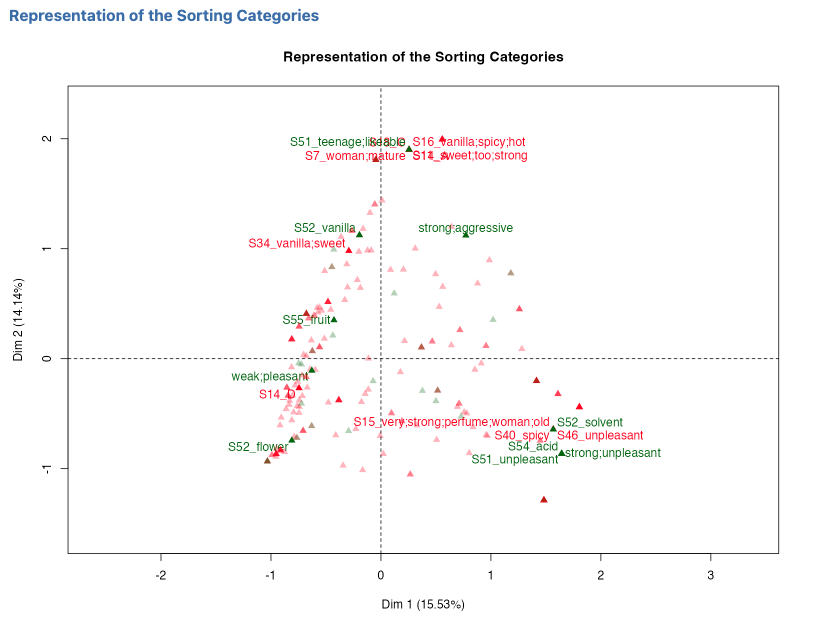
This map represents the categories specific to each subject. Their direction from the origin helps characterise the sides of the axes; the direct distance between a category and a stimulus should not be interpreted as an ordinary measure of similarity. The Active categories, Supplementary categories, and Selection of categories options control what is displayed.
Point of vigilance: with many subjects, this map can become very crowded. The default value cos2 10 helps keep only a more readable subset of categories.
7.6.4 Representation of the Subjects — subject map
This map represents the subjects as the qualitative variables of the MCA. It shows which subjects are associated with the common dimensions. The Subjects Associated with the Dimensions table quantifies this association through R² and p-values; the map should not be read as a direct index of consensus between subjects.
7.6.5 Eigenvalue Decomposition — eigenvalue table
| Element | Meaning |
|---|---|
| Dim. | Dimension number |
| Eigenvalue | Eigenvalue |
| % of variance | Share explained by the dimension |
| Cumulative % | Cumulative share explained |
If the first two dimensions explain a large share of the variance, the 1/2 plane summarises the structure of the sorting data well. Otherwise, explore other factor planes.
7.6.6 Automatic Description of the Dimensions
This output contains the Subjects Associated with the Dimensions and Sorting Categories Associated with the Dimensions tables. It identifies the subjects and categories associated with each dimension according to Significance threshold (%) and Number of dimensions. It therefore describes sorting contrasts; a sensory meaning can be assigned to an axis only when group labels or other external information support that interpretation.
7.6.7 Representation of the Stimuli According to Clusters (available if “Representation of the clusters” is activated)
This graph projects the groups obtained by HCPC. Classification uses the first components defined by Number of components, not only the two displayed axes. The percentages shown on the HCPC map are therefore computed relative to this retained space and may be higher than those on the full MCA map.
| Element | Meaning |
|---|---|
| Stimuli in the same cluster | Similar sorting profiles in the retained space |
| Clearly separated clusters | More differentiated families of stimuli |
7.6.8 Numerical tables (optional)
The coordinate, contribution, and cosine tables for stimuli and subjects appear only if you check the corresponding options in Numerical Indicators. They provide precise values to complement the visual interpretation.
7.7 Example: the perfumes_sorting dataset
The perfumes_sorting dataset concerns 12 perfumes grouped by 58 subjects during a free sorting task. It is used to illustrate the function outputs. Some groups were also verbalised, which allows the function to produce both a factorial representation of the perfumes and a textual description of the profiles. The numerical values and graphics discussed below come directly from the analysis results. To load this dataset, open jamovi, click the icon in the top left corner, the three stacked lines, then Open → Data Library → SEDA.
7.7.1 Example settings
To reproduce this example, use the following values.
| Option | Value |
|---|---|
| Stimuli Labels | Product |
| Active Subjects | S1 to S50 |
| Supplementary Subjects | S51 to S58 |
| R code | checked |
| Ventilation level (%) | 5 |
| X-axis / Y-axis | 1 / 2 |
| Significance threshold (%) (dimension description) | 5 |
| Number of dimensions | 2 |
| Significance threshold (%) (sorting-label description) | 5 |
| Number of components | 5 |
| Representation of the clusters | checked to visualise the classification |
| Number of clusters | -1 |
Figure 7.2 shows the configuration used for the free-sorting example.
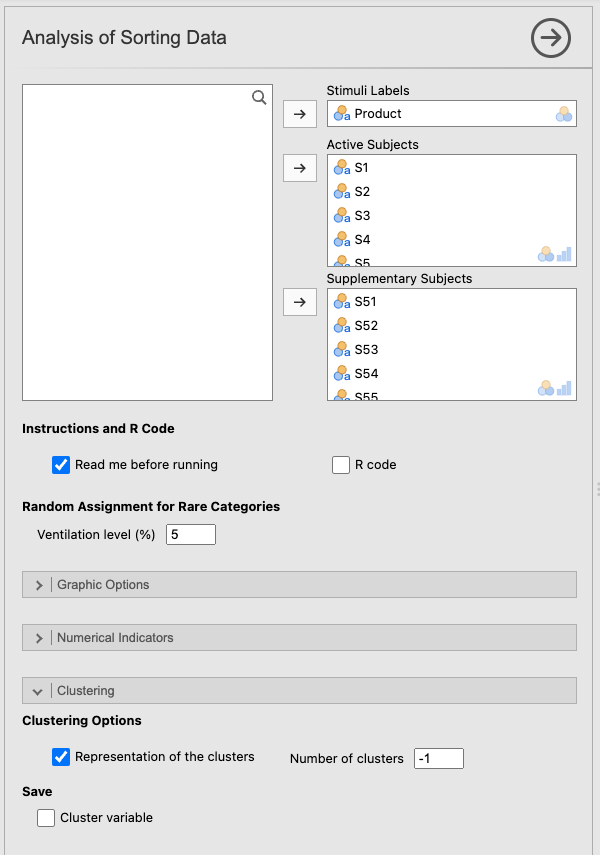
Reproducibility note: with Ventilation level (%) = 5, rare categories may be ventilated by random reassignment before the MCA. Small numerical differences can therefore occur between runs. Use Ventilation level (%) = 0 only if exact run-to-run reproducibility of the factor solution is required, bearing in mind that this changes the analysis.
7.7.2 Analysis of the Description of the Stimuli table
The table shows that several perfumes have very marked lexical profiles. A few particularly clear readings, with the actual values from the analysis:
Aromatics Elixir is strongly associated with strong (test value 4.08, p < .001; 14.16% of internal occurrences versus 4.65% overall), ammonia (test value 2.26), and spicy (2.18). Conversely, it is clearly under-represented by fruit (test value -2.63), flower (-2.40), and sweet (-2.10): it is the most intense and least floral or sweet perfume in the panel.
Chanel N5 stands out with soap (test value 3.72, p < .001; 7.69% versus 1.61% overall), deodorant (2.06), and unpleasant (1.99), while being under-represented by fruit (-2.47) and flower (-2.21).
Lolita Lempicka is characterised by sweet (test value 3.94, p < .001; 14.55% versus 4.98% overall) and vanilla (2.09), but is under-represented by flower (-2.34).
Pleasures is the perfume most associated with flower (test value 3.46, p < .001; 15.00% versus 5.70% overall) and fresh (2.05), and clearly opposed to strong (-2.46).
Shalimar is characterised by old (test value 2.67, p = 0.008) and sun (2.40), and under-represented by flower (-2.42).
Angel is associated with vanilla (2.23), heady (1.99), and too (1.99), but under-represented by fresh (-2.03) and flower (-2.19).
7.7.3 Analysis of the Representation of the Stimuli graph
Figure 7.3 shows the representation of the stimuli in the MCA factorial plane.
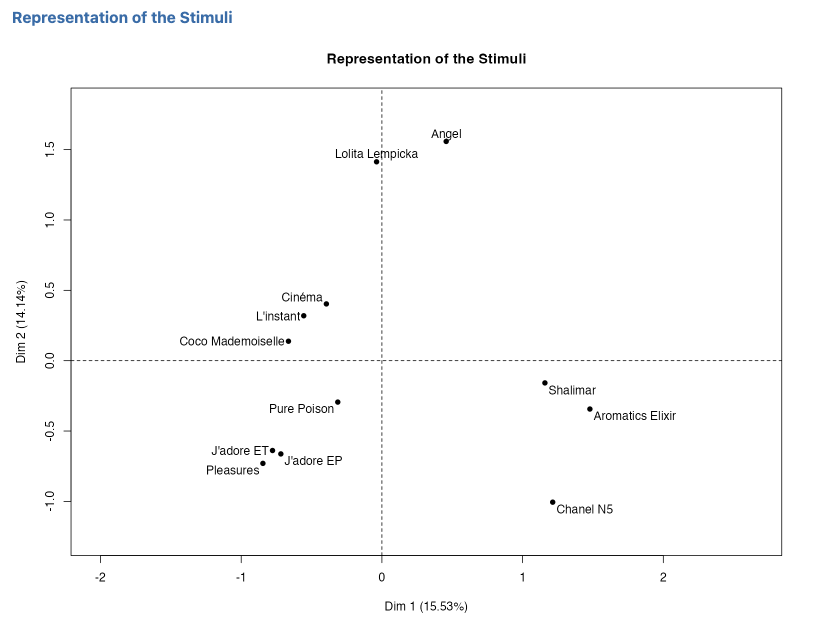
The map reveals a readable perceptual structure on the Dim. 1 (15.53%) / Dim. 2 (14.14%) plane. On the right side of the plane, Shalimar, Aromatics Elixir, and Chanel N5 form a group — confirming their strong, spicy, and low-floral profile. On the lower left, J’adore ET, J’adore EP, and Pleasures group together around a floral and fresh profile. At the top, Angel and Lolita Lempicka occupy a clearly distinct position on the second dimension — a vanilla and sweet profile. Cinéma, L’instant, and Coco Mademoiselle form an intermediate central-left area, with profiles that are more difficult to name without the textual description.
7.7.4 Analysis of the Eigenvalue Decomposition table
The first two dimensions explain 29.67% of the total variance (15.53% + 14.14%). This is clearly less concentrated than in a classical PCA: in free sorting, subjects have very different ways of structuring the space, which spreads the information across many dimensions. The 1/2 plane is a useful but partial summary — as confirmed by the following dimensions (Dim. 3: 11.03%, Dim. 4: 9.97%, etc.).
7.7.5 Analysis of the Automatic Description of the Dimensions table
On Dim. 1, the categories most strongly associated with the positive side (right, strong perfumes) are solvent (S52, estimate 1.31), unpleasant (S46, 1.27), spicy (S40, 1.24), very;strong;perfume;woman;old (S15, 1.32), soap;ancient (S48, 1.26), and acid (S54, 1.22). The negative side is associated with flower;fresh (S43, -0.60), fresh;light (S23, -0.81), and flower (S47, -0.68). Dim. 1 therefore clearly opposes strong, spicy, acidic, or unpleasant perfumes to fresh and floral perfumes.
On Dim. 2, the positive side is dominated by vanilla;spicy;hot (S16, 1.51), woman;mature (S7, 1.55), sweet;too;strong (S11, 1.43), teenage;likeable (S51, 1.54), and vanilla;sweet (S34, 1.05). The negative side includes soap (S12, -1.03) and fresh (S10, -0.50). Dim. 2 therefore opposes vanilla, sweet, enveloping perfumes to fresher or soapy profiles.
7.7.6 Analysis of the Representation of the Stimuli According to Clusters graph
Figure 7.4 shows the representation of the stimuli according to the clusters.
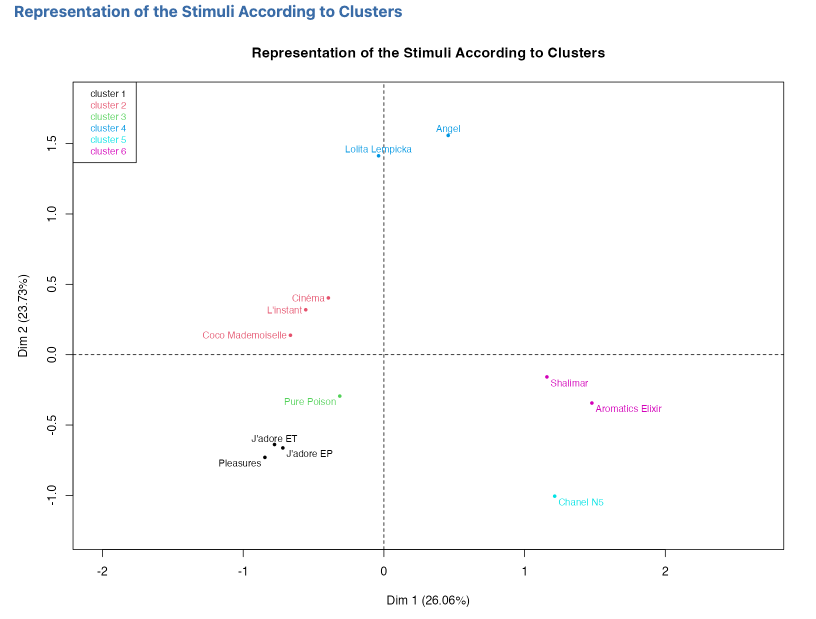
With Number of components = 5, HCPC works on the first five MCA dimensions, which together account for 59.59% of the inertia. The classification map therefore displays 26.06% on Dim. 1 and 23.73% on Dim. 2 instead of 15.53% and 14.14% on the MCA map: the percentages are renormalized within the five-dimensional space actually used for clustering.
With Number of clusters = -1, the automatic classification retains six clusters. The labels in parentheses below are supported by the textual and dimension descriptions, not by clustering alone:
- a cluster grouping J’adore ET, J’adore EP, and Pleasures (floral, fresh);
- a cluster grouping Coco Mademoiselle, L’instant, and Cinéma (intermediate profiles);
- a cluster containing only Pure Poison (singular profile);
- a cluster grouping Angel and Lolita Lempicka (vanilla, sweet);
- a cluster containing only Chanel N5 (soapy, unpleasant);
- a cluster grouping Shalimar and Aromatics Elixir (strong, spicy, old).
7.7.7 Synthetic interpretation
This example clearly shows the value of the function. It does not only provide a proximity map between perfumes: it also shows which words subjects associate with each perfume, which oppositions structure the space, and which groups of perfumes emerge from the classification. Cross-reading the description table, the factor map, and the classification makes it possible to name the families more precisely than with the map alone.
What we take away from this example: free sorting analysis makes it possible to link the factorial structure of the categorisations, their verbal interpretation, and the formation of coherent families of stimuli.
7.8 From jamovi to the Rj Editor
Once the Rj Editor has been configured with System R as described in Chapter 1, check R code to display the script corresponding to the analysis. The dataset open in jamovi is available as data.
For free sorting, the script loads FactoMineR, builds the active and supplementary subject table, and runs MCA() with supplementary subjects in quali.sup and Ventilation level (%) in level.ventil. When verbal sorting labels are available, it also builds the textual data, uses textual() followed by descfreq(), and reproduces the eigenvalues, the maps with plot.MCA(), and the automatic description with dimdesc().
If clustering is requested, the script extracts exactly the first coordinates defined by Number of components, passes them to HCPC(), and displays the map with plot.HCPC(). The percentages on this map therefore describe the retained clustering space; in the example, five dimensions account for 59.59% of the inertia, leading to 26.06% and 23.73% on the HCPC map.
7.9 Practical tips
- Always check that all columns in Active Subjects are categorical before running the analysis.
- Use Stimuli Labels almost systematically to obtain readable maps.
- Start with Ventilation level (%) = 5.
- If the category map is too crowded, keep Selection of categories = cos2 10 and uncheck Active categories if necessary.
- Leave Number of clusters = -1 for automatic determination at first.
- Keep Number of components = 5 for a first clustering.
- If the first two dimensions explain little variance, explore other factor planes.
- Activate Coordinates and Cluster variable if you want to reuse the results in other jamovi analyses.
7.10 In summary
This analysis transforms free sorting data into a reading of the stimuli that is simultaneously factorial, textual, and typological. It combines an MCA on the categorisations provided by the subjects, a description of the stimuli based on the labels, and, if desired, an automatic classification of the stimuli. Its main value is to preserve subjects’ individual information while constructing a consensus and directly interpretable view of the perceptual space of the stimuli.