3 QDA Data — Multivariate Representation with Ellipses
3.1 Introduction
This analysis is designed for Quantitative Descriptive Analysis (QDA) data, that is, when several subjects evaluate several stimuli using a fixed list of sensory attributes. It extends the univariate characterisation of the sensory space by providing a multivariate representation of the stimuli and their variability. It answers two complementary questions: which stimuli are sensorially similar and is this proximity stable despite variability between subjects? Its central output is a map of the stimuli enriched with ellipses, which visualise not only the position of the stimuli, but also the robustness of this position under panel resampling.
Why not use a standard alternative?
A PCA applied directly to the raw data may mix two sources of variation: the stimulus effect and the subject effect. In sensory analysis, some subjects systematically rate higher or lower than others, or use the scale more or less broadly. This analysis takes this subject/stimulus structure into account to produce a representation better suited to QDA data.
3.2 Understanding what happens under the hood
3.2.1 Selection of sensory attributes
Before constructing the map, the function identifies the attributes that discriminate the stimuli sufficiently. This selection depends on the value of Descriptor selection threshold (%). The stricter the threshold, the more streamlined the map will be; the broader it is, the more exhaustive the representation will be, although sometimes more crowded. The default value is 20%, which makes it a good starting point for exploration.
3.2.2 Correction of the subject effect
A simple way to understand the next step is to say that the analysis reconstructs mean sensory profiles by stimulus, while taking differences between subjects into account. Two options are involved here:
- Center by subject corrects differences in average level between subjects;
- Scale by subject corrects differences in the amplitude with which subjects use the scale.
The objective is to prevent a very generous, very severe, or very “spread-out” subject from artificially distorting the map of the stimuli.
3.2.3 Principal component analysis
A PCA is then performed on the resulting table of sensory profiles. It produces the stimulus map, the sensory attribute map, the eigenvalue table, and the automatic description of the dimensions. This factor space is then used as the reference space for projecting the virtual panels.
3.2.4 Virtual panels and supplementary individuals
The key point of the function is the use of resampling. In PCA, it is possible to distinguish between active individuals — those used to construct the axes — and supplementary individuals — those projected afterwards, without modifying the axes. This is precisely the mechanism that makes it possible to construct the ellipses.
At each simulation, a subset of subjects is drawn with replacement from the original panel, new mean stimulus profiles are recalculated, and then projected into the factor space as supplementary individuals. The dispersion of these projections around each stimulus is then summarised by an ellipse.
These ellipses therefore describe the variability of the mean position of the stimuli when the composition of the panel changes, not the simple raw dispersion of individual ratings.
Note: the computation may take a few seconds, because it relies on a large number of virtual panels. During this computation, it is better to avoid changing other options so as not to restart the procedure unnecessarily.
3.2.5 Comparison between stimuli
The function also computes a comparison between pairs of stimuli, presented as a matrix of p-values. The Hotelling test is performed on the selected factor plane defined by X-axis and Y-axis. This output complements the visual reading of the ellipses; the pairwise comparisons are exploratory and are reported without multiplicity adjustment.
3.2.6 Automatic description of the dimensions
Finally, the function provides an automatic description of the axes, filtered according to the value of Significance threshold (%). It helps identify which attributes are most strongly associated with each dimension and gives a sensory meaning to the axes.
3.3 Expected data structure
The data must contain:
- one column identifying the stimuli;
- one column identifying the subjects;
- at least two numeric columns corresponding to the sensory attributes.
Each row corresponds to the evaluation of one stimulus by one subject. If a subject evaluates the same stimulus several times (repetitions or sessions), each evaluation must appear on a separate row.
Before running the analysis in jamovi, check in the Data tab that:
- the variable intended for Stimulus Effect is categorical;
- the variable intended for Subject Effect is categorical;
- all variables intended for Sensory Attributes are numeric.
3.4 Interface guide
The analysis appears in the menu SEDA > Fixed List of Attributes > Representation of the Stimulus Space. The interface includes three variable drop zones, an Instructions and R Code section containing the Read me before running and R code checkboxes, and then three collapsible menus: Graphic Options, Resampling Options, and Numerical Indicators.
3.4.1 Variables to complete
3.4.1.1 Stimulus Effect
Role: identifies the stimuli to be represented on the map. Impact on the computation: each level of this variable becomes a mean point and, where applicable, an ellipse on the map. Practical tip: use clear labels, because they will appear directly in the graphics.
3.4.1.2 Subject Effect
Role: identifies the subjects. Impact on the computation: this variable is essential for correcting the subject effect and for generating the virtual panels used in the bootstrap. Practical tip: check that the same subject keeps exactly the same identifier throughout the file.
3.4.1.3 Sensory Attributes
Role: groups together the sensory attributes used to construct the factor space. Impact on the computation: only numeric attributes are accepted; the number of calculable dimensions depends on the number of retained attributes. Practical tip: start by including all relevant sensory attributes, then refine the selection with Descriptor selection threshold (%).
3.4.2 Instructions and R Code
3.4.2.1 Read me before running
Role: displays integrated help in the results. Impact on the computation: none. Practical tip: leave it checked during the first uses. It is enabled by default.
3.4.2.2 R code
Role: displays the R script corresponding to the analysis in an R Code output. Impact on the computation: none. Practical tip: enable this option to reproduce the analysis in the Rj Editor or continue working in R. It is disabled by default.
3.4.3 Standardization of the Sensory Attributes: Scale to unit variance
Role: standardises the sensory attributes when performing the PCA. Impact on the computation: when checked, each attribute contributes equally to the construction of the axes; when unchecked, the most dispersed attributes have a greater influence on the construction of the axes. Practical tip: leave this option checked in most analyses. It is enabled by default.
3.4.4 Selection of the Sensory Attributes: Descriptor selection threshold (%)
Role: sets the threshold for selecting attributes according to their relationship with the stimulus effect. Impact on the computation: a low threshold retains few attributes and produces a more readable map; a higher threshold retains more attributes and gives a broader view. Practical tip: the default value is 20%, a good starting point for exploration. For a stricter version, start at 5%.
3.4.5 Graphic Options
3.4.5.1 Components to Plot — X-axis and Y-axis
Role: choose the dimensions displayed on the horizontal and vertical axes. Impact on the computation: they do not change the PCA itself, but they modify the displayed factor plane. The selected dimensions must exist in the analysis, otherwise the function generates an error. Practical tip: start with X-axis = 1 and Y-axis = 2, the default values.
3.4.5.2 Individual variability around stimuli
Role: adds a graph showing the dispersion of individual evaluations around each stimulus. Impact on the computation: it does not add a new analysis, but provides an additional graphical output useful for assessing consensus between subjects. Practical tip: activate this option if you want to distinguish a consensual stimulus from a stimulus perceived more variably. The default value is disabled.
3.4.5.3 Variability around sensory attributes
Role: adds a graph showing the variability of sensory attributes under resampling. Impact on the computation: it provides a graphical output useful for assessing the stability of attribute interpretation. Practical tip: activate this option when you want to comment on the robustness of the axes. The default value is disabled.
3.4.6 Resampling Options
3.4.6.1 Subjects per virtual panel
Role: defines the number of subjects drawn in each virtual panel. Impact on the computation: the closer this value is to the actual panel size, the more similar the simulated panels will be to it. Practical tip: use the actual panel size as a starting point. The default value is 20.
3.4.6.2 Number of virtual panels
Role: sets the total number of simulated virtual panels. Impact on the computation: the larger this number, the more stable the ellipses will be from one run to another, but computation time increases. Practical tip: 300 is a good compromise to start with; for a final rendering, it may be useful to increase this number to 500. The default value is 300.
3.4.6.3 Ellipse alpha (%)
Role: defines the alpha level used to draw the confidence ellipses. Impact on the computation: a lower alpha produces wider ellipses; with the default value of 5%, the ellipse corresponds to a 95% level in the covariance-based construction of the simulated positions. Practical tip: leave 5% for a first trial.
3.4.6.4 Center by subject
Role: centres responses subject by subject. Impact on the computation: corrects differences in average level between subjects and often improves the comparison between profiles. Practical tip: leave this option checked in almost all analyses. It is enabled by default.
3.4.6.5 Scale by subject
Role: standardises responses subject by subject. Impact on the computation: corrects differences in amplitude between subjects, but modifies the initial structure more strongly than centring alone. Practical tip: leave this option unchecked at first. It is disabled by default.
3.4.7 Numerical Indicators
3.4.7.1 Significance threshold (%)
Role: defines the significance threshold for the automatic description of the dimensions. Impact on the computation: the stricter the threshold, the more selective the automatic description will be. Practical tip: the default value, 5%, is well suited to a first reading.
3.4.7.2 Number of dimensions
Role: defines the number of dimensions included in the automatic description. Impact on the computation: SEDA computes enough components to describe these dimensions; the displayed plane is selected separately with X-axis and Y-axis. Practical tip: the default value, 2, is appropriate for an initial reading.
3.5 Step-by-step procedure
- Open your dataset in jamovi.
- In the Data tab, check that the stimulus variable is categorical, the subject variable is categorical, and the sensory attributes are numeric.
- Open SEDA > Fixed List of Attributes > Representation of the Stimulus Space.
- Place the stimulus variable in Stimulus Effect.
- Place the subject variable in Subject Effect.
- Place all sensory attributes in Sensory Attributes.
- Leave Scale to unit variance checked.
- Set Descriptor selection threshold (%) to 20% for an initial exploration, or to 5% for a stricter selection.
- Keep X-axis = 1 and Y-axis = 2.
- Leave Center by subject checked and Scale by subject unchecked at first.
- Set Subjects per virtual panel to the panel size or a close value, leave Number of virtual panels at 300 and Ellipse alpha (%) at 5.
- Activate Individual variability around stimuli and/or Variability around sensory attributes according to your needs.
- In Numerical Indicators, keep the default values for a first trial.
- First read Representation of the Stimuli and Representation of the Sensory Attributes, then Eigenvalue Decomposition and Automatic Description of the Dimensions. Next assess stability with Representation of the Stimuli with Confidence Ellipses and Hotelling Test.
- Then return to the settings to test the stability of your conclusions.
3.6 Interpretation of results
3.6.1 Representation of the Stimuli with Confidence Ellipses
This is the central graph of the function. Each stimulus is represented by a mean point in the factor space, surrounded by an ellipse. The axes come from the PCA, and the percentage displayed on each axis indicates the share of variance explained.
| Element | Meaning |
|---|---|
| Two close stimuli | Similar sensory profiles |
| Strongly overlapping ellipses | Less clear visual separation under resampling |
| Small ellipse | Position stable across simulated panels |
| Large ellipse | More uncertain position |
| Clearly separated ellipses | Clearer visual separation under resampling |
Point of vigilance: the ellipses describe the variability of the mean position of the stimuli under panel resampling. They do not directly represent the raw dispersion of individual ratings. Ellipse overlap is a visual guide, not a significance test; use the Hotelling Test for the pairwise statistical comparison.
3.6.2 Representation of the Stimuli
This map shows the relative positions of the stimuli without emphasizing the ellipses. It is useful for quickly identifying the main groupings and oppositions between stimuli.
3.6.3 Representation of the Sensory Attributes
This map shows the sensory attributes in the factor space. It is read using three simple cues:
- direction: toward which stimuli the attribute “pulls” the structure;
- length: the longer an attribute is, the better it is represented on the plane;
- the angle between two attributes: small angle = positive correlation; angle close to 180° = opposition; angle close to 90° = near-independence.
This is the map that gives sensory meaning to the axes.
3.6.4 Individual variability around stimuli (available only if the option is activated)
This output shows the dispersion of individual evaluations around the mean point of each stimulus. A compact cloud indicates strong consensus; a dispersed cloud indicates a more heterogeneous perception between subjects.
3.6.5 Variability of the Sensory Attributes (available only if the option is activated)
This output shows the dispersion of the position of sensory attributes in the virtual panels. A compact cloud means that the attribute is stable; a dispersed cloud indicates that its interpretation is more fragile and depends more strongly on the composition of the panel.
3.6.6 Eigenvalue Decomposition
This table gives, for each dimension, the eigenvalue, the percentage of variance explained, and the cumulative percentage. If the first two dimensions explain a large share of the variance, the 2D map summarises the data well. Otherwise, it is prudent to explore other planes, for example Dim 1 / Dim 3.
3.6.7 Automatic Description of the Dimensions
This table identifies the attributes most strongly linked to each dimension, filtered by Significance threshold (%). It reports, in particular, their correlation with the dimension and the associated p-value. A dimension requested in Number of dimensions may not appear if no attribute reaches the selected significance threshold. The table helps give the axes a sensory interpretation and complements the attribute map.
3.6.8 Hotelling Test
This p-value matrix compares each pair of stimuli on the selected factor plane defined by X-axis and Y-axis. A low p-value provides evidence of separation between two stimuli on that plane; a high p-value does not establish such separation. These pairwise comparisons are exploratory and are reported without multiplicity adjustment. The table therefore complements the visual reading of the ellipses rather than replacing it.
3.7 Example: the sensochoc dataset
The sensochoc dataset describes 6 chocolates evaluated by 29 subjects on 14 sensory attributes. It is used to illustrate the function outputs. The numerical values and graphics discussed below come directly from the analysis results. To load this dataset, open jamovi, click the icon in the top left corner, the three stacked lines, then Open → Data Library → SEDA.
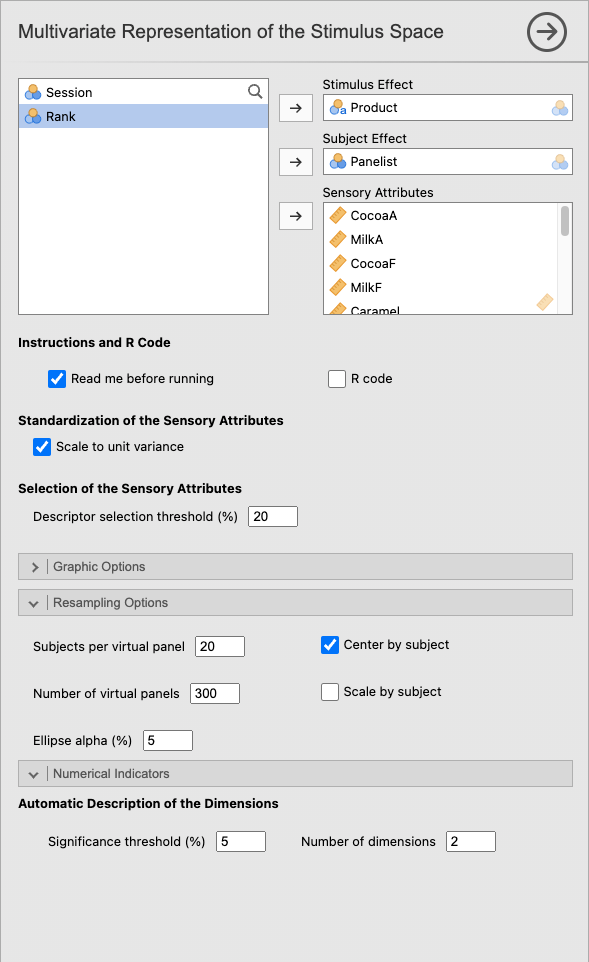
3.7.1 Example settings
To reproduce this example, use the following values.
| Option | Value |
|---|---|
| Stimulus Effect | Product |
| Subject Effect | Panelist |
| Sensory Attributes | all sensory attributes |
| Scale to unit variance | Checked |
| Descriptor selection threshold (%) | 20 |
| X-axis / Y-axis | 1 / 2 |
| Subjects per virtual panel | 20 |
| Number of virtual panels | 300 |
| Ellipse alpha (%) | 5 |
| Center by subject | Checked |
| Scale by subject | Unchecked |
| Significance threshold (%) | 5 |
| Number of dimensions | 2 |
Reproducibility note: the numerical results and resampling-based plots discussed below were generated with the default value Subjects per virtual panel = 20. Use 20 to reproduce this chapter exactly. Because the actual panel contains 29 subjects, 29 is a natural choice for a new final analysis; changing this value changes the resampling-based outputs.
Figure 3.1 summarises the configuration used for this example.
3.7.2 Analysis of the Representation of the Stimuli with Confidence Ellipses graph
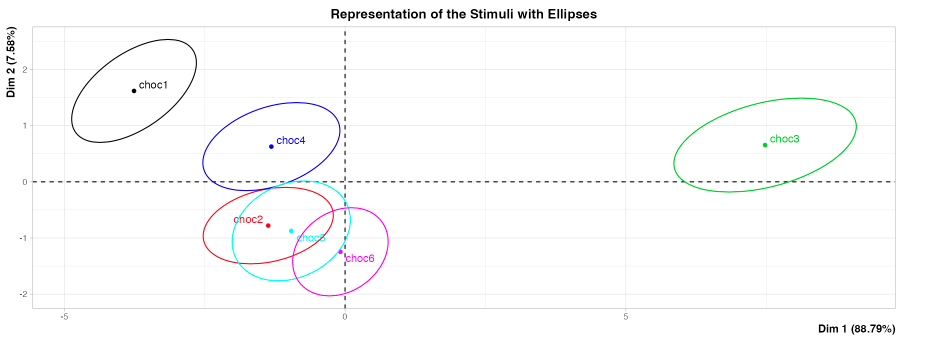
Figure 3.2 shows the 6 chocolates in the Dim. 1 / Dim. 2 plane. The first dimension alone accounts for 88.79% of the total variance — this 2D plane is therefore a very faithful representation of the data. The second dimension explains an additional 7.58%.
On the horizontal axis (Dim. 1), choc1 and choc3 occupy the two opposite extremes: choc1 on the left (bitter, cocoa side), choc3 on the right (milky, sweet side). These are the two chocolates whose profiles are most clearly opposed, which is consistent with the results of the previous chapter. choc2, choc5, and choc6 are grouped in the centre, close to the origin. choc4 is located slightly above the horizontal axis, between choc1 and the central group.
The ellipses provide information about the robustness of these positions. The ellipses of choc2, choc5, and choc6 overlap widely: their visual separation is therefore less clear when panel composition changes. Conversely, choc1 and choc3 have ellipses clearly separated from all the others: their visual separation appears robust across the simulated panels. The Hotelling Test then provides the statistical assessment of these differences on the displayed plane.
3.7.3 Analysis of the Hotelling Test table
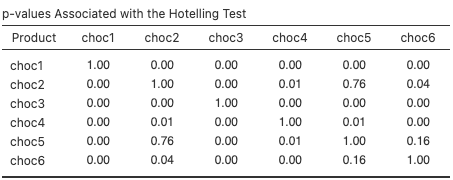
Figure 3.3 presents the p-values that quantitatively complement the ellipse reading on the Dim. 1 / Dim. 2 plane. The pairs choc2 / choc5 (p = 0.76) and choc5 / choc6 (p = 0.16) have high p-values: no separation is established between these chocolates on this plane. The pair choc2 / choc6 is more borderline (p = 0.04). Conversely, all comparisons involving choc1 or choc3 give p-values of 0.00 in the results of this example. These pairwise comparisons are exploratory and are not adjusted for multiplicity.
3.7.4 Analysis of the Representation of the Sensory Attributes graph
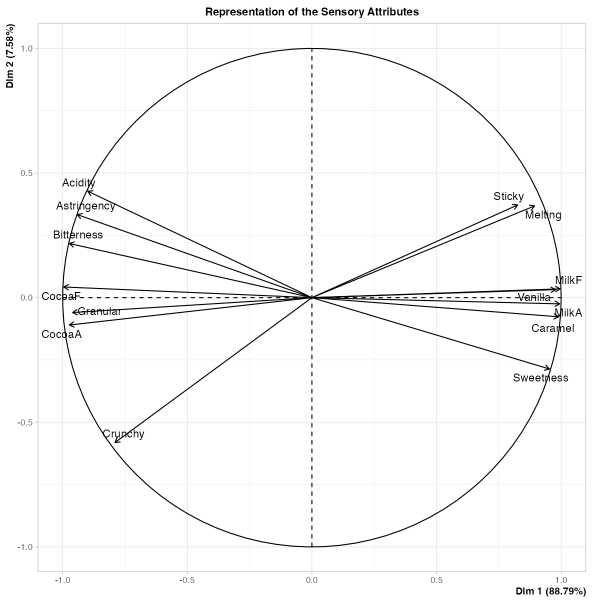
Figure 3.4 shows the 14 attributes distributed around the horizontal axis. On the right are grouped MilkF, Sweetness, Caramel, Vanilla, MilkA, and Melting — this is the profile of choc3. On the left are grouped CocoaF, CocoaA, Bitterness, Astringency, Acidity, Crunchy, and Granular — this is the profile of choc1. The horizontal axis therefore clearly corresponds to an opposition between sweet milk chocolate / bitter dark chocolate.
The length of the arrows also indicates the quality of representation of each attribute on this plane. Crunchy has a shorter arrow pointing downward, indicating that it is less well represented on this plane than CocoaF or MilkF, whose arrows almost reach the edge of the circle. Arrow length does not, by itself, measure stability across panels; that question is addressed by the Variability of the Sensory Attributes plot.
3.7.5 Analysis of the Automatic Description of the Dimensions table
The automatic description of the dimensions confirms the very strong opposition carried by Dim. 1. The most positively correlated attributes are MilkF (1.00), MilkA (0.99), Caramel (0.99), Vanilla (0.98), and Sweetness (0.95). At the opposite end, the strongest negative correlations are observed for CocoaF (-1.00), Bitterness (-0.97), CocoaA (-0.97), Granular (-0.96), and Astringency (-0.94). With Significance threshold (%) = 5, no attribute is retained for Dim. 2 in this table.
3.7.6 Synthetic interpretation
The sensory space of the chocolates is very largely structured by a single strong opposition, carried by the first dimension: on one side, a milky, sweet, and melting profile; on the other, a bitter, cocoa, and more textured profile. The stimulus map and the attribute map converge toward the same overall reading. The ellipses additionally show that not all stimuli are differentiated with the same robustness. Finally, the Hotelling test confirms that some proximities observed on the map do not correspond to clearly established differences.
What we take away from this example: the analysis does not only show where the stimuli are located in the sensory space, but also how robustly they can be distinguished.
3.8 From jamovi to the Rj Editor
Once the Rj Editor has been configured to use System R as described in Chapter 1, check R code to display the script corresponding to the analysis. For this chapter, the code loads SensoMineR and FactoMineR, prepares the selected variables, and then calls panellipse() using the settings chosen in the interface.
The generated script also includes a small helper that prevents panellipse() from opening an additional graphics device that is not supported by the Rj Editor. This adaptation is handled automatically: no additional setting is required.
The resulting objects provide access, among other things, to eigenvalues, Hotelling tests, and the automatic description of dimensions. The code therefore provides a reproducible continuation of the analysis performed in SEDA.
3.9 Practical tips
- Always start with X-axis = 1 and Y-axis = 2.
- Leave Scale to unit variance checked in most cases.
- Use Center by subject almost systematically.
- Activate Scale by subject only if you have a good reason to think that subjects use the scale with very different amplitudes.
- Start with 300 simulated panels; increase to 500 or more for a more stable final version.
- Set Descriptor selection threshold (%) between 5% and 20% depending on whether you want a streamlined or more exhaustive map.
- Never interpret the stimulus map without looking at the attribute map.
- Do not conclude that there is a difference from ellipse overlap or separation alone.
- Consult Hotelling Test to complement the visual reading when the overlap is ambiguous.
- If the first two dimensions summarise little variance, explore other factor planes.
3.10 In summary
This analysis produces a multivariate representation of stimuli suited to QDA data, while taking the subject effect into account in the construction of sensory profiles. It enriches the classical factor map with ellipses obtained by resampling, making it possible to assess the robustness of the observed positions. It therefore shows not only where the stimuli are located, but also how confidently they can be located there.