1 Introduction
1.1 Presenting jamovi
1.1.1 What is jamovi?
In one sentence: jamovi is a free, modern, and accessible statistics package, designed for both teaching and research.
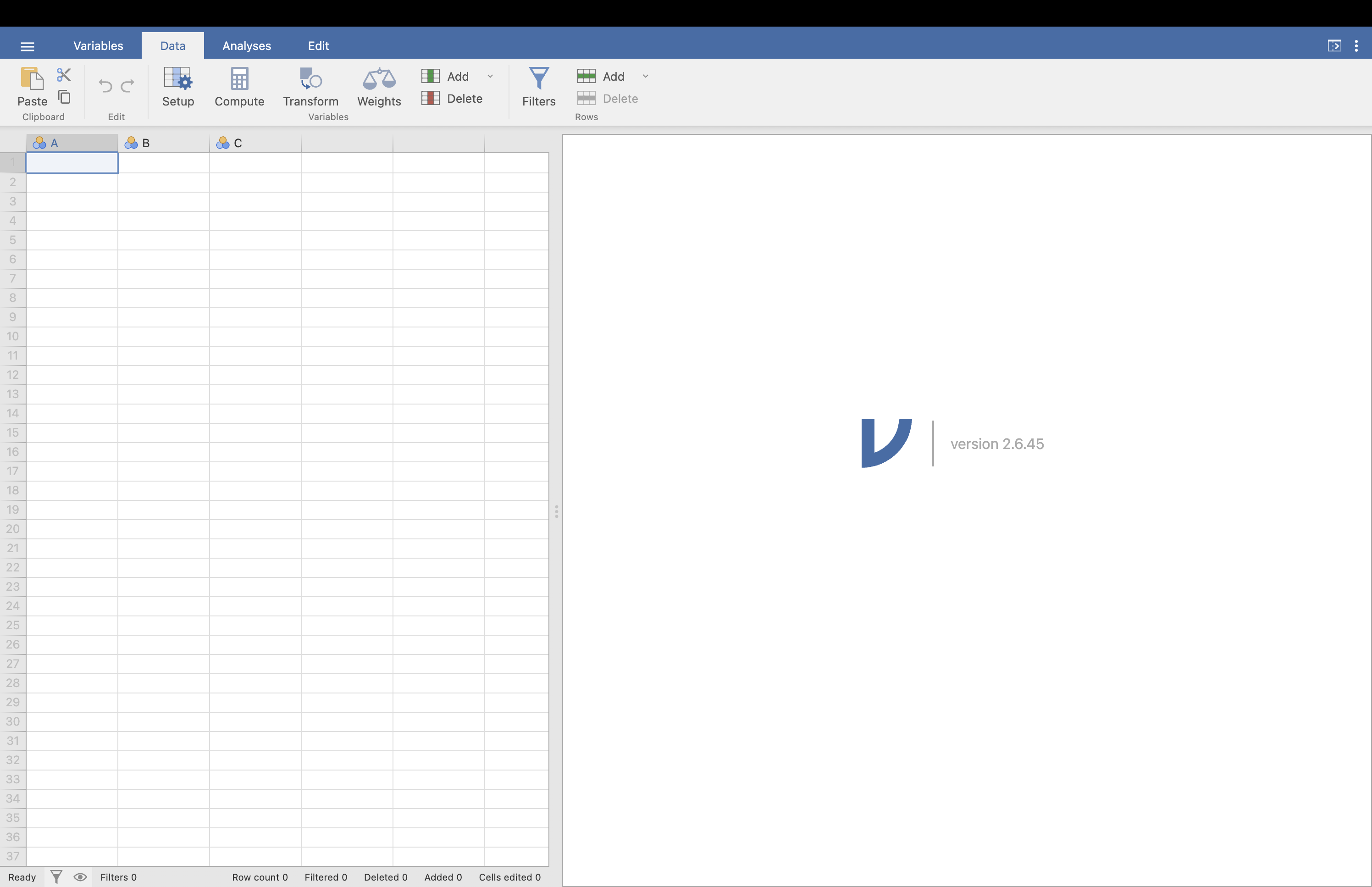
Developed by contributors from the JASP project, jamovi relies on R for its statistical calculations while providing a graphical interface that requires no code at all. In practical terms, its interface works like a dynamic spreadsheet1: the data are visible and editable in a sheet on the left, and the results update in real time on the right. This organisation makes the tool accessible to both beginners and experienced users.
Figure 1.1 presents the general jamovi interface.
One often underestimated advantage of jamovi is its ability to save everything in a single .omv file: the data, the analysis options selected, and the results. This greatly facilitates reproducibility and the sharing of work, two areas in which traditional spreadsheets show their limits.
A comparison with other common tools is useful for situating jamovi:
| Feature | Excel / Google Sheets | jamovi |
|---|---|---|
| Data entry | Yes | Yes |
| Statistical analyses | No (requires external tools) | Yes (built in natively) |
| Reproducibility | Difficult to track | Yes, via the .omv format |
| Advanced modules | No | Yes, via extensions |
| Open source | No | Yes |
What about XLSTAT? XLSTAT is a paid-for Excel plug-in that adds advanced statistical functions. Although it is powerful, it remains proprietary, dependent on Microsoft Excel, and its cost may be a barrier for students or organisations with limited budgets. jamovi offers comparable features, and in some areas superior ones, while being entirely free and independent.
1.1.2 How do you install jamovi?
Installation is straightforward and requires no technical skills. jamovi is cross-platform: it works in the same way on Windows, macOS, and Linux. To install it, go to jamovi.org/download, choose your operating system, then run the downloaded file.
On the download page, two versions are offered. The Solid version is the most stable and thoroughly tested: it is the one to favour for teaching, practical classes, and research. The Current version includes the very latest features but may contain a few minor instabilities.
1.2 Modules in jamovi
In jamovi, a module is the equivalent of a package in R or Python: it adds specific features to the software, whether in the form of new types of analyses, graphs, or statistical models.
The jamovi module ecosystem is already rich and covers many needs:
| Module | Main features |
|---|---|
| GAMLj | Linear, logistic, and hierarchical models |
| semlj | Structural equation models |
| jsq | Bayesian methods |
| PAMLj | Statistical power analysis |
| lsj | Interactive exercises from the Learning Stats manual |
| MEDA | PCA, CA, MCA, MFA (FactoMineR under jamovi) |
| SEDA | Sensory data analysis (SensoMineR under jamovi) |
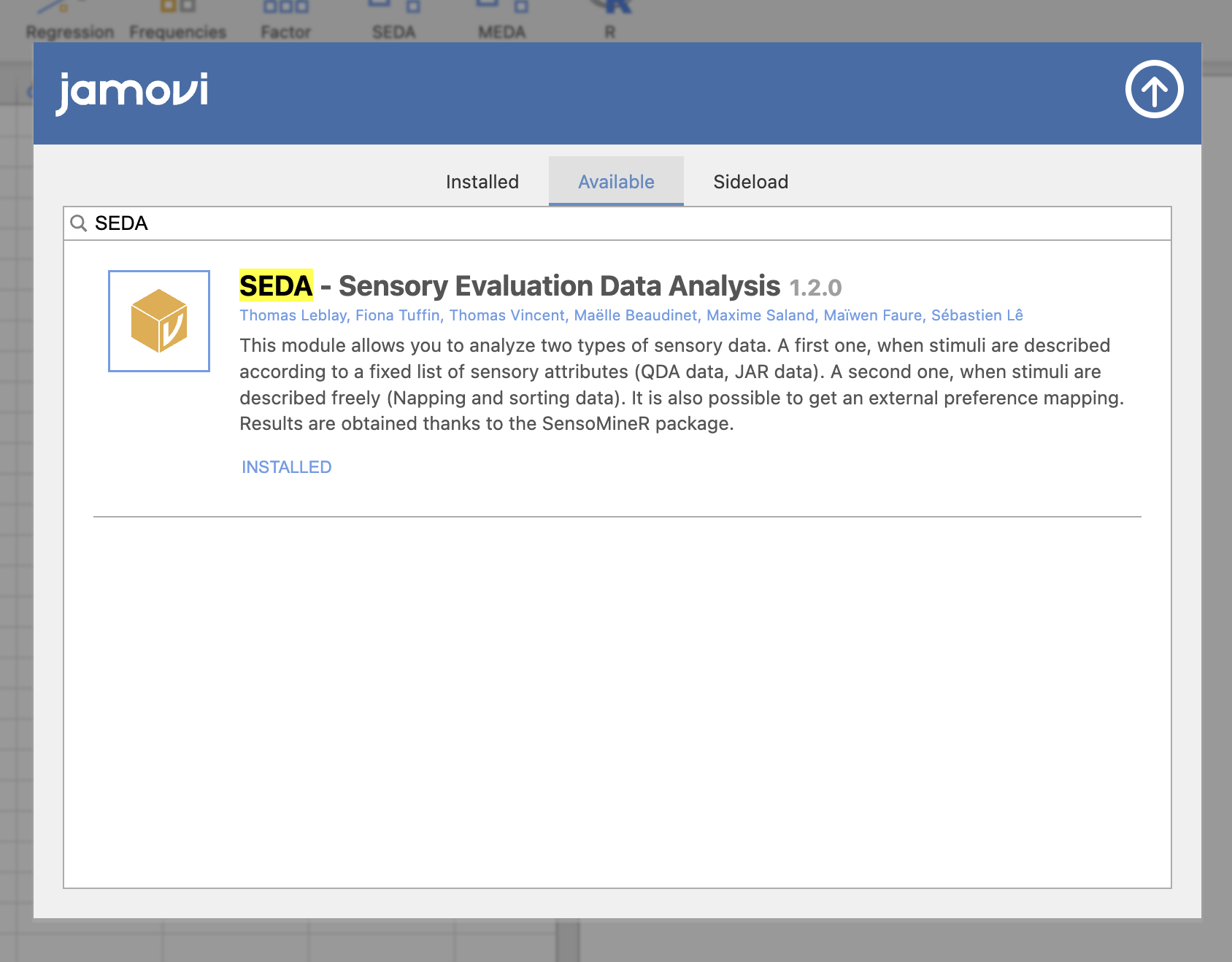
To install a module, simply open jamovi, go to the Modules tab in the top right-hand corner, select jamovi library, then choose the module you want and click Install. Some modules still under development may also be installed manually from a .jmo file.
Figure 1.2 illustrates installing a module from the jamovi library.
1.3 The SEDA module
SEDA (Sensory Evaluation Data Analysis) is the jamovi module dedicated to the statistical analysis of sensory data. It is based on the R package SensoMineR and makes the main statistical methods used in sensory analysis available through a graphical interface — without requiring a single line of code.
Its menu is organised into three sections corresponding to three broad ways of producing sensory data.
Figure 1.3 presents the general organisation of the SEDA menu.
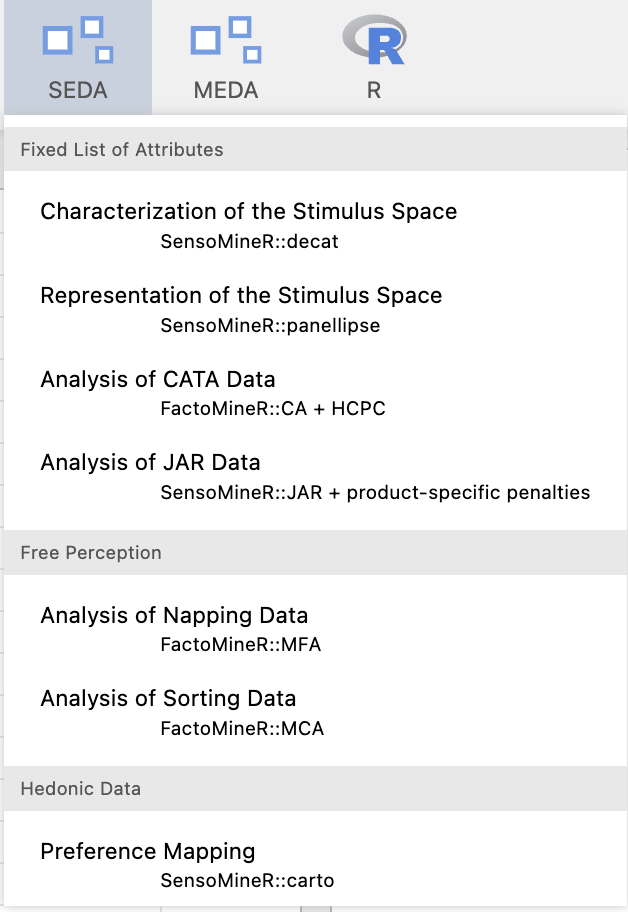
The first section, Fixed List of Attributes, brings together methods in which subjects evaluate stimuli using a list of attributes defined in advance. This is the classic case of QDA (Quantitative Descriptive Analysis) data, where a trained panel scores the intensity of each attribute for each product. Here, SEDA offers two complementary analyses: one to characterise the stimuli attribute by attribute (by identifying which attributes differentiate them and which characterise each stimulus in particular), and another to represent the sensory space in a multivariate way (by producing a map of the stimuli enriched with confidence ellipses reflecting the stability of the positions according to panel composition). This section also includes the analysis of CATA (Check-All-That-Apply) data, in which respondents tick from a list the terms they feel are present in a stimulus, and the analysis of JAR (Just About Right) data, in which respondents indicate whether each attribute is too strong, too weak, or just about right — making it possible to estimate the penalties these deviations impose on liking.
The second section brings together holistic approaches, in which subjects evaluate the stimuli globally, without any predefined list of attributes. Two methods are covered: Napping (projective mapping), in which each subject positions the stimuli on a rectangle according to their perceived similarities, and free sorting (sorting task), in which each subject freely groups the stimuli into categories. In both cases, SEDA produces a consensual representation of the stimuli by combining the individual maps — by Multiple Factor Analysis for Napping, and by Multiple Correspondence Analysis for free sorting — and may complement this representation with an automatic classification of the stimuli.
The third section, Hedonic Data, is dedicated to liking data. It contains preference mapping, which combines an already constructed representation space (for example, from a PCA) with individual liking scores in order to identify favourable regions of that space. SEDA can also classify consumers from their centred liking profiles and produce preference maps for the resulting segments. This analysis is the natural extension of the previous analyses: once the sensory space has been constructed and interpreted, preference mapping helps identify which regions are favourable and whether the same preference structure is shared across consumer segments.
This booklet covers all seven of these analyses, in the order of the SEDA menu. Throughout the rest of this booklet, the terms product and stimulus mean the same thing and are used interchangeably.
1.4 From jamovi to R: the Rj Editor
SEDA can display the R script corresponding to the options selected in the interface. Throughout this booklet, these scripts provide a bridge from a point-and-click analysis to a reproducible R workflow.
Before using the Rj Editor for the first time, open its settings with the gear icon and select System R rather than jamovi R. Your system R installation must contain the packages required by the analysis — mainly SensoMineR and FactoMineR in this booklet — as well as jmvconnect, which gives the Rj Editor access to the dataset currently open in jamovi under the name data.
When an analysis offers the R code option, check it to display a script that can be copied into the Rj Editor. The chapters below explain the main functions and arguments used by each generated script.
1.5 Some useful references
- Official website: jamovi.org
- Online documentation
- jamovi user manual
- Navarro, D., Foxcroft, D., & Meunier, J.-M. (2020). Apprentissage des statistiques avec Jamovi.
- Love, J., Selker, R., Marsman, M. et al. (2019). JASP: Graphical statistical software for common statistical designs. Journal of Statistical Software, 88, 1–17.
- Navarro, D., & Foxcroft, D. (2018). Learning statistics with jamovi.
- Community and modules: forum.jamovi.org
A spreadsheet is a data-processing tool organised into rows and columns, such as Microsoft Excel or Google Sheets.↩︎