6 Napping Data — Consensus Representation
6.1 Introduction
This analysis is designed for Napping (projective mapping) data, in which each subject positions a set of stimuli in a two-dimensional space according to their perceived similarities and differences. It makes it possible to construct a consensus representation of the stimuli from several individual maps and, if desired, to group the stimuli into clusters. The function relies on a Multiple Factor Analysis (MFA) to merge the different pairs of coordinates into a single space.
Why not use a standard alternative?
A PCA applied directly to all coordinate columns would account for relationships among the variables, but would ignore their grouping by subject. In Napping, the data are naturally organised as X/Y pairs provided by each subject. Here, each pair is treated as a group in the MFA, which makes it possible to construct a more suitable compromise between the different individual maps. This MFA uses type = "c" in FactoMineR: the coordinates are centred but not standardised, preserving the geometry and relative scale of each Napping sheet rather than forcing X and Y to have the same variance.
6.2 Understanding what happens under the hood
6.2.1 The data are read as pairs of coordinates
The function expects in Active (X,Y) Coordinate Pairs a set of numeric columns organised as consecutive pairs: X then Y for a first subject, X then Y for a second subject, and so on. The same principle applies to Supplementary (X,Y) Coordinate Pairs. If the number of columns is odd in either block, the analysis is rejected. The active block must contain at least 4 columns, that is, 2 pairs. The same coordinate cannot be selected as both active and supplementary.
6.2.2 An MFA on groups of size 2, without standardisation
The core of the analysis is an MFA. Each X/Y pair in Active (X,Y) Coordinate Pairs is treated as a group of two quantitative variables. The MFA constructs a common space that summarises the information carried by all subjects while balancing the contribution of the groups. With type = "c", the coordinates are centred but not standardised, preserving the relative scale of the two coordinates in each individual configuration.
6.2.3 The role of supplementary coordinates
If you provide variables in Supplementary (X,Y) Coordinate Pairs, they are projected as supplementary groups in the MFA. They do not participate in the construction of the axes, but make it possible to locate other subjects in the same space.
6.2.4 Automatic description of the dimensions
Once the MFA has been computed, the function produces an automatic description of the dimensions filtered by Significance threshold (%) and Number of dimensions. This output helps understand which variables are most strongly linked to the first axes.
6.2.5 Saving dimensions and clustering
The Number of dimensions to save/use for clustering field determines how many first dimensions are saved in Coordinates and used for clustering. If fewer dimensions are available than requested, SEDA uses those that can actually be computed. If you activate Representation of the clusters or request Cluster variable, the function runs an HCPC on these retained dimensions. By default, clustering uses the first 5 dimensions, and Number of clusters = -1 lets FactoMineR choose the number of clusters automatically. The percentages displayed on the HCPC map refer to this retained clustering space and may therefore differ from those on the full MFA map.
6.3 Expected data structure
The data must contain:
- one optional but strongly recommended column for Stimuli Labels;
- at least two pairs of numeric columns in Active (X,Y) Coordinate Pairs;
- optionally, numeric pairs in Supplementary (X,Y) Coordinate Pairs.
Each row corresponds to a stimulus. This distinguishes this analysis from other analyses where each row corresponds to an individual response. SEDA requires at least three stimuli. If Stimuli Labels is not completed, the function uses row numbers as stimulus names.
Before running the analysis in jamovi, check in the Data tab that:
- Stimuli Labels is categorical if used, with no missing or empty values and one unique label per stimulus;
- all active and supplementary coordinates are numeric, complete, and finite;
- the number of columns in each coordinate block is even;
- no coordinate is selected as both active and supplementary;
- each X/Y pair has variability in at least one of its two coordinates.
6.4 Interface guide
The analysis appears in SEDA > Free Perception > Analysis of Napping Data. The interface includes three variable drop zones, an Instructions and R Code section, followed by the Graphic Options, Numerical Indicators, and Clustering menus.
6.4.1 Variables to complete
6.4.1.1 Stimuli Labels
Role: provides the names of the stimuli in the outputs. Impact on the computation: this variable does not modify the MFA itself, but determines the labels displayed in the graphs and the names associated with the saved coordinates. Practical tip: use short and unique labels; otherwise, the maps quickly become difficult to read.
6.4.1.2 Active (X,Y) Coordinate Pairs
Role: groups together the active coordinates used to construct the consensus representation. Impact on the computation: each X/Y pair becomes a group in the MFA. The number of columns must be even, and the function requires at least 4 columns. Practical tip: strictly respect the order X, Y, X, Y… to avoid incorrectly organising the groups.
6.4.1.3 Supplementary (X,Y) Coordinate Pairs
Role: adds pairs of coordinates projected as supplementary groups. Impact on the computation: these coordinates do not influence the construction of the axes, but are projected into the MFA space. Practical tip: use this block to project a second panel without modifying the main compromise.
6.4.2 Instructions and R Code
6.4.2.1 Read me before running
Role: displays integrated help in the results. Impact on the computation: none. Practical tip: leave it checked during the first uses. It is enabled by default.
6.4.2.2 R code
Role: displays the R script corresponding to the analysis in an R Code output. Impact on the computation: none. Practical tip: enable this option to reproduce the analysis in the Rj Editor. It is disabled by default.
6.4.3 Graphic Options
6.4.3.1 X-axis
Role: chooses the dimension displayed on the horizontal axis. Impact on the computation: it does not modify the MFA, but changes the factor plane displayed in the graphs. Practical tip: start with 1, the default value.
6.4.3.2 Y-axis
Role: chooses the dimension displayed on the vertical axis. Impact on the computation: it does not modify the MFA, but changes the factor plane displayed in the graphs. Practical tip: start with 2, the default value.
6.4.4 Numerical Indicators
6.4.4.1 Significance threshold (%)
Role: sets the significance threshold for the automatic description of the dimensions. Impact on the computation: the stricter the threshold, the more selective the automatic description will be. Practical tip: the default value of 5% is a good starting point.
6.4.4.2 Number of dimensions
Role: determines the number of axes described automatically. Impact on the computation: it controls the dimension description output and also helps determine the number of MFA dimensions computed internally. Practical tip: leave 2 for a first reading.
6.4.4.3 Number of dimensions to save/use for clustering
Role: defines the number of first dimensions to save and use for clustering. Impact on the computation: it determines the columns saved in Coordinates and the dimensions passed to HCPC; if fewer dimensions are available, SEDA uses the maximum that can be computed. Practical tip: the default value of 5 is a good starting point.
6.4.4.4 Coordinates
Role: saves the factorial coordinates of the stimuli in the jamovi data sheet. Impact on the computation: it does not add a new calculation, but saves the results of the MFA. Practical tip: activate this output if you want to reuse the dimensions in other jamovi analyses.
6.4.5 Clustering
6.4.5.1 Representation of the clusters
Role: activates the display of the clustering graph. Impact on the computation: when this option is checked, the function computes the HCPC classification if necessary and displays the map of stimuli according to clusters. Practical tip: leave it unchecked for a first reading, then activate it to complement the consensus map with a group-based reading.
6.4.5.2 Number of clusters
Role: sets the number of clusters to extract. Impact on the computation: with -1, the number of clusters is determined automatically; otherwise, you can impose an integer between 2 and the number of stimuli minus 1. Practical tip: start with -1, then set a number only if you have a clear analytical justification.
6.4.5.3 Cluster variable
Role: saves the cluster membership of each stimulus as a new variable in jamovi. Impact on the computation: it does not add a new calculation, but saves the results of the classification. Practical tip: useful if you then want to cross the clusters with other variables in jamovi.
6.5 Step-by-step procedure
- Open your dataset in jamovi.
- In the Data tab, check that the coordinate columns are numeric and organised in X/Y pairs.
- If you have a stimulus identifier column, check that it is categorical.
- Open SEDA > Free Perception > Analysis of Napping Data.
- Place the stimulus name column in Stimuli Labels.
- Place all active pairs in Active (X,Y) Coordinate Pairs.
- If needed, place the supplementary pairs in Supplementary (X,Y) Coordinate Pairs.
- Check that the coordinates are complete and that each block contains an even number of columns.
- Leave X-axis = 1 and Y-axis = 2.
- Leave Significance threshold (%) = 5, Number of dimensions = 2, and Number of dimensions to save/use for clustering = 5.
- Start with Eigenvalue Decomposition, then read Representation of the Stimuli and Representation of the Subjects.
- Then consult Automatic Description of the Dimensions.
- Activate Representation of the clusters if you want to display Representation of the Stimuli According to Clusters.
- Check R code to obtain the reproducible script, and optionally save Coordinates and Cluster variable.
6.6 Interpretation of results
6.6.1 Representation of the Stimuli
This is the important result of the function. It represents the stimuli in the consensus factor space constructed by the MFA. Two close stimuli were positioned similarly by the set of subjects; two distant stimuli are perceived as more different. The percentage displayed on each axis indicates the share of variance explained by the corresponding dimension.
| Element | Meaning |
|---|---|
| Two close stimuli | Similar global perceptions |
| Two distant stimuli | Different global perceptions |
| Compact group of stimuli | Family of stimuli perceived as close |
Point of vigilance: the stimulus map shows a perceptual structure, but it is not always sufficient to name the axes. Adding supplementary information, such as verbalisation, can greatly help interpretation.
6.6.2 Representation of the Subjects
This map represents the X/Y coordinate groups — that is, the subjects’ individual configurations — in the factor space. It shows how each Napping sheet relates to the dimensions of the compromise.
| Element | Meaning |
|---|---|
| Groups occupying similar positions | Configurations related similarly to the common dimensions |
| Group far from the origin on one axis | Configuration strongly related to that dimension |
| Group close to the origin | Configuration weakly related to the displayed dimensions |
6.6.3 Eigenvalue Decomposition — eigenvalue table
| Element | Meaning |
|---|---|
| Dim. | Dimension number |
| Eigenvalue | Importance of the dimension |
| % of variance | Share of variability explained |
| Cumulative % | Cumulative share explained |
If the first two dimensions explain a large share of the variance, the 1/2 plane provides a good summary; otherwise, it may be useful to explore other factor planes.
6.6.4 Automatic Description of the Dimensions
This output automatically describes the retained dimensions according to Significance threshold (%) and Number of dimensions. It helps identify which variables are most strongly linked to the axes and becomes particularly useful when Supplementary (X,Y) Coordinate Pairs have been added.
6.6.5 Representation of the Stimuli According to Clusters (available if “Representation of the clusters” is activated)
This graph shows the stimuli in the factor space, grouped according to the clusters derived from the HCPC classification. Classification uses the first dimensions defined by Number of dimensions to save/use for clustering, not only the two displayed axes. The percentages on the HCPC map are therefore computed relative to this retained space.
| Element | Meaning |
|---|---|
| Stimuli in the same cluster | Similar positioning profiles |
| Clearly separated clusters | Well-differentiated families of stimuli |
6.6.6 Coordinates (data output)
This output saves the factorial coordinates of the stimuli on the first dimensions retained by Number of dimensions to save/use for clustering. Each column corresponds to one dimension (Dim. 1, Dim. 2, etc.).
6.6.7 Cluster variable (data output)
This output saves the cluster membership of each stimulus as a nominal variable. It is useful for subsequent analyses in jamovi.
6.7 Example: the perfumes_napping dataset
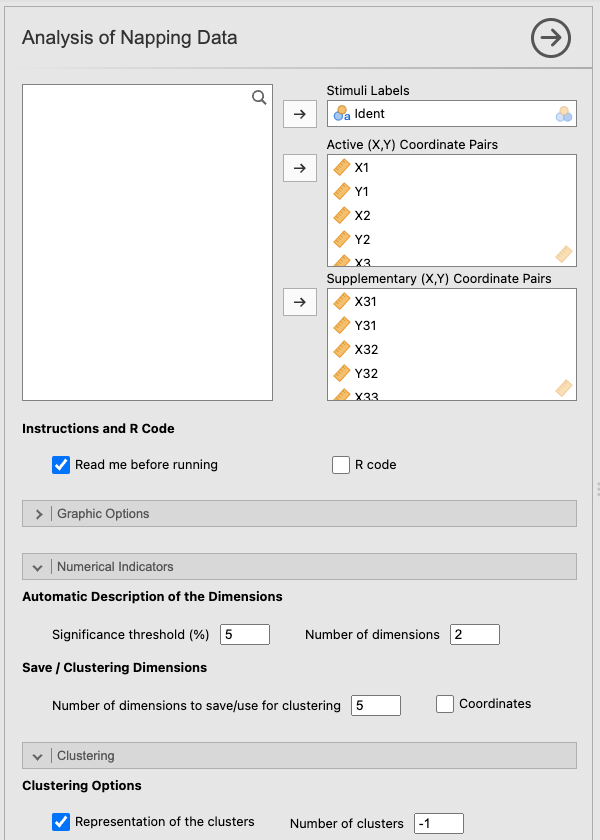
The perfumes_napping dataset describes 12 perfumes positioned on a sheet (with dimensions 60 by 40) by 60 subjects, that is, 120 coordinate columns (one X/Y pair per subject). It is used to illustrate the function outputs. The numerical values and graphics discussed below come directly from the analysis results. To load this dataset, open jamovi, click the icon in the top left corner, the three stacked lines, then Open → Data Library → SEDA.
6.7.1 Example settings
To reproduce this example, use the following values.
| Option | Value |
|---|---|
| Stimuli Labels | variable Ident |
| Active (X,Y) Coordinate Pairs | the first 60 coordinate columns (30 pairs) |
| Supplementary (X,Y) Coordinate Pairs | the following 60 coordinate columns (30 pairs) |
| X-axis / Y-axis | 1 / 2 |
| Significance threshold (%) | 5 |
| Number of dimensions | 2 |
| Number of dimensions to save/use for clustering | 5 |
| Representation of the clusters | checked |
| Number of clusters | -1 |
| R code | checked |
Figure 6.1 shows the configuration used for the Napping example.
6.7.2 Analysis of the Representation of the Stimuli graph
Figure 6.2 shows the representation of the stimuli in the common factor space.
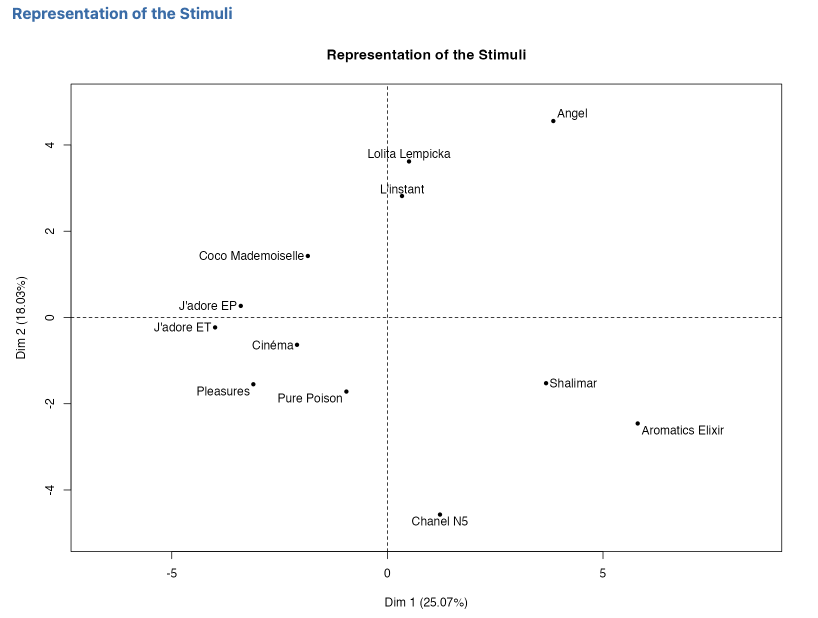
The map reveals a fairly clear perceptual structure on the Dim. 1 (25.07%) / Dim. 2 (18.03%) plane. On the horizontal axis, Aromatics Elixir and Shalimar are clearly located on the right (positive coordinates on Dim. 1), whereas J’adore EP, J’adore ET, Coco Mademoiselle, Cinéma, Pleasures, and Pure Poison are located on the left. Chanel N5 differs from this right-hand group by a low position on the second dimension (strongly negative value on Dim. 2), which slightly isolates it from the Shalimar / Aromatics Elixir pair. On the vertical axis, Angel, Lolita Lempicka, and L’instant are clearly located above the centre, forming a coherent perceptual group at the top of the plane.
6.7.3 Analysis of the Representation of the Subjects graph
Figure 6.3 shows the representation of the subjects’ individual configurations.
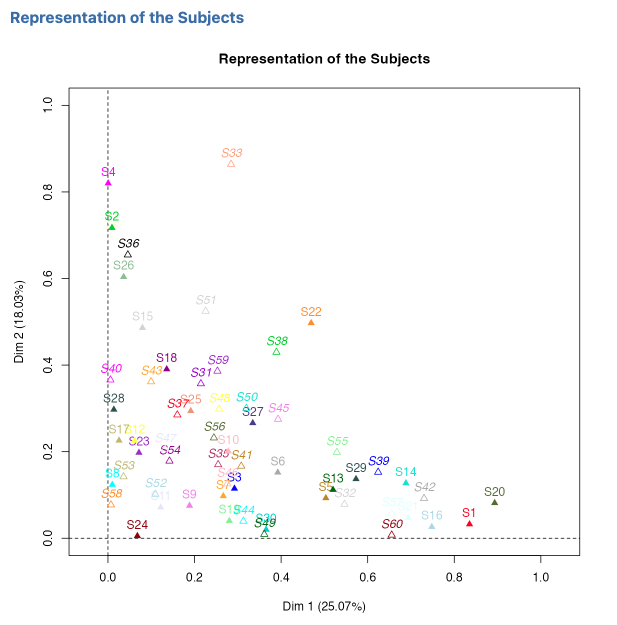
The subject map represents the 60 coordinate groups, S1 to S60. Groups far from the origin on Dim. 1, such as S1 or S20, are strongly related to the first common dimension. Groups such as S4 or S30, located higher on Dim. 2, are more strongly related to the second. The many groups close to the origin are less strongly associated with the two displayed dimensions. This map therefore describes the relationship between individual configurations and the compromise; it is not, by itself, a numerical index of consensus.
6.7.4 Analysis of the Eigenvalue Decomposition table
The first two dimensions explain 43.09% of the total variance (Dim. 1: 25.07%, Dim. 2: 18.03%). The 1/2 plane therefore provides a useful first summary, but more than half of the variability lies beyond this plane. The following dimensions remain non-negligible (Dim. 3: 12.31%, Dim. 4: 9.58%, Dim. 5: 7.96%), which justifies examining other factor planes when needed.
6.7.5 Analysis of the Automatic Description of the Dimensions table
The Automatic Description of the Dimensions output identifies the X/Y coordinates most correlated with each axis. For Dim. 1, the strongest positive correlations are X20 (r = 0.93), X1 (r = 0.92), and Y21 (r = 0.90). At the opposite end, Y48 (r = -0.91) and X42 (r = -0.85) have the strongest negative correlations. These results identify which directions of the individual configurations are most aligned with, or opposed to, the first compromise dimension. They do not by themselves provide a sensory meaning for the axis.
6.7.6 Analysis of the Representation of the Stimuli According to Clusters graph
Figure 6.4 shows the representation of the stimuli according to the clusters.
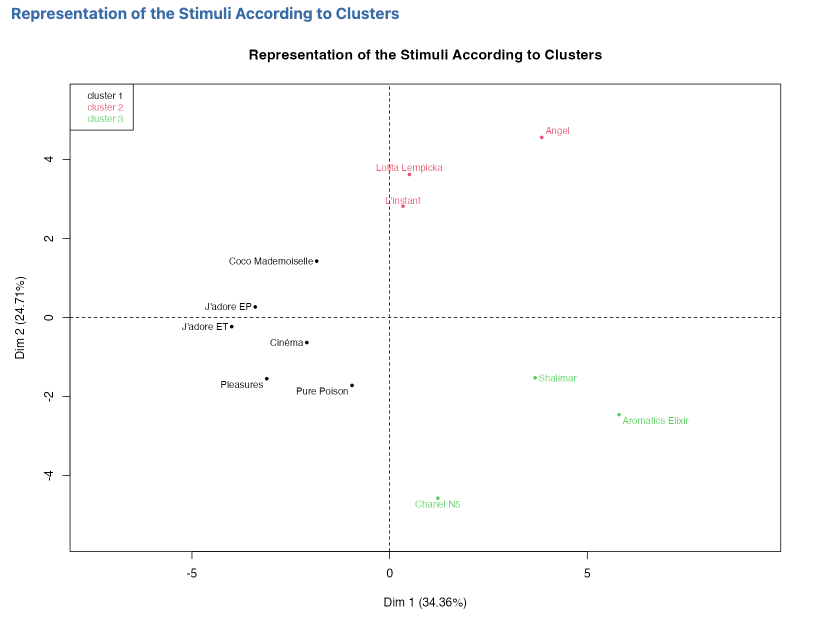
With Number of dimensions to save/use for clustering = 5, the retained MFA dimensions account for 72.95% of the total inertia. The HCPC map therefore expresses Dim. 1 and Dim. 2 relative to this five-dimensional space: approximately 34.37% and 24.72%, rather than 25.07% and 18.03% on the full MFA map.
With Number of clusters = -1, the automatic classification retains three clusters:
- Cluster 1 (black): Coco Mademoiselle, J’adore EP, J’adore ET, Cinéma, Pleasures, and Pure Poison;
- Cluster 2 (red): Angel, Lolita Lempicka, and L’instant;
- Cluster 3 (green): Shalimar, Aromatics Elixir, and Chanel N5.
On the 1/2 plane, the first group lies mainly on the left, the second at the top, and the third on the right and lower part of the map. However, the classification is calculated from the first five retained dimensions, not only from this plane. Without external sensory information or verbalisation, qualities such as “floral”, “light”, or “intense” should not be assigned automatically to these clusters.
6.7.7 Synthetic interpretation
This example clearly shows the value of the function. It does not only provide an average map of the perfumes: it constructs a consensus space, shows how the individual configurations relate to its dimensions, and identifies which groups of perfumes emerge from the classification. The three clusters are clear in this example, but their sensory interpretation would require additional information.
What we take away from this example: Napping analysis transforms a set of individual maps into a consensus representation, then makes it possible to examine the relationships between individual configurations and common dimensions as well as the groups of stimuli.
6.8 From jamovi to the Rj Editor
Once the Rj Editor has been configured with System R as explained in Chapter 1, check R code to display the script corresponding to the analysis. The dataset currently open in jamovi is available as data.
For Napping, the script loads FactoMineR, constructs one X/Y pair per subject, and runs MFA() with type = "c". Supplementary pairs are specified through num.group.sup. The script then reproduces the eigenvalues, the stimulus and subject maps with plot.MFA(), and the automatic dimension description with dimdesc().
If clustering is requested, the code retains exactly the first dimensions defined by Number of dimensions to save/use for clustering, runs HCPC() on that retained space, and displays the map with plot.HCPC(). In this example, the generated code uses 30 active subjects, 30 supplementary subjects, and 5 dimensions for clustering.
6.9 Practical tips
- Always check that the columns in Active (X,Y) Coordinate Pairs are complete and supplied in X/Y pairs.
- Use Stimuli Labels almost systematically and check that the labels are unique.
- Start with X-axis = 1 and Y-axis = 2; if the first two dimensions summarise little variance, explore other factor planes.
- Keep Number of dimensions to save/use for clustering = 5 for a first trial, especially if you are considering clustering.
- Leave Number of clusters = -1 at first to let the function choose automatically.
- Read Representation of the Subjects as the relationship between individual configurations and the common dimensions, not as a direct consensus index.
- Do not assign sensory meaning to axes or clusters without verbalisation or external information that can characterise them.
- Activate Coordinates and Cluster variable if you want to reuse the results in other jamovi analyses.
6.10 In summary
This analysis constructs a consensus map of the stimuli from Napping data by combining the individual maps through a centred but non-standardised MFA that balances the contribution of the groups. It represents the structure of the stimuli and the relationship between individual configurations and the common dimensions, and can be complemented by an HCPC clustering of the stimuli on the retained dimensions. Its main value is to transform a set of individual maps into a common representation of perceptual proximities, without requiring a predefined list of attributes.