8 Hedonic Data — Preference Mapping
8.1 Introduction
This analysis makes it possible to construct a preference map from two types of information: an already computed two-dimensional representation space, and several Liking Variables corresponding to liking scores. It is used to identify which areas of this space are associated with stronger preference, and to represent the proportion of consumers for whom each region of the plane is predicted to be favourable under the selected threshold. In SEDA, this principle can be used both for external preference mapping (sensory space) and for internal preference mapping (hedonic space), depending on the origin of the two axes used. The analysis can also classify consumers from their liking profiles and produce a preference map for each segment.
Why not use a standard alternative?
A mean liking score by product makes it possible to compare products with one another, but it does not make it possible to relate preferences to an already constructed representation space. Here, the function fits a preference model for each liking variable, then combines these models into a surface indicating the % of consumers associated with each area of the plane. This provides a spatial reading of preferences, which is more informative than a simple table of means.
8.2 Understanding what happens under the hood
8.2.1 The function does not construct the representation space itself
The function does not calculate the axes of the plane: it expects you to provide one variable for X-axis and one variable for Y-axis. The integrated help text explicitly specifies the recommended workflow: for an external map, these axes may come from a PCA on sensory attributes; for an internal map, they may come from a PCA on hedonic scores. In both cases, the two components must first have been saved in the data, then selected in this module.
How to retrieve dimensions from the MEDA module
- Open the MEDA module (menu MEDA > PCA).
- Place your variables in the appropriate fields: for an external map, use your sensory attributes; for an internal map, use your hedonic variables.
- Expand the Numerical Indicators section, then the Save subsection.
- In the Number of components field, enter 2 (or more if you want to explore other planes).
- Activate the Coordinates output: jamovi then automatically creates two new columns in your data sheet, named by default Dim. 1 and Dim. 2, containing the coordinates of each stimulus on the first two components.
- Then return to SEDA > Hedonic Data > Preference Mapping and place Dim. 1 in X-axis and Dim. 2 in Y-axis.
If your dataset contains the sensory attributes, the hedonic scores, and the stimulus identifiers in the same file — as is the case for the senso_hedo_cocktail dataset — this workflow can be performed entirely in jamovi without any intermediate export or import.
8.2.2 A model is fitted for each liking variable
The function first gathers the two coordinates of the plane and all columns placed in Liking Variables. Each liking column represents one consumer. A separate preference model is fitted for each consumer. The model depends on Regression model:
- Quadratic (default): linear effects, quadratic terms, and interaction between the two axes. At least 7 stimuli are required for a non-saturated fit; in practice, more products are preferable.
- Vector: linear effects only. At least 4 stimuli are required.
- Circular: linear effects with a common radial quadratic curvature. At least 5 stimuli are required.
- Elliptical: linear effects and separate quadratic terms on each axis, without interaction. At least 6 stimuli are required.
A simple interpretation is that Vector describes a preference direction; Quadratic allows the most flexible surface; Circular and Elliptical describe local optima under different shape constraints. If the geometry of the two coordinates cannot support the selected model, SEDA asks for a simpler model or a richer product space.
8.2.3 Construction of the preference surface
For each consumer, SEDA fits the selected model to the observed products and predicts liking over a regular grid covering the X-axis / Y-axis plane. Each consumer’s predicted surface is then standardised to mean 0 and standard deviation 1 over the grid.
At each grid location, SEDA counts how many consumers have a standardised predicted value above Preference threshold (SD). This count is converted to a percentage and forms the % of consumers surface.
8.2.4 Preference threshold (SD)
The threshold is expressed in standard deviations of each consumer’s own predicted surface. With the default value 0, a location is considered favourable for a consumer when predicted liking is above that consumer’s average predicted level over the grid. A positive value makes the criterion more selective; a negative value broadens the favourable region. This is a preference criterion, not a statistical significance threshold.
8.2.5 What the final map really represents
The final map does not directly display the observed product-by-product scores. It shows a modelled surface constructed from the individual consumer models. The regions indicate the proportion of consumers for whom each location in the plane exceeds the selected preference threshold. The % of consumers legend should therefore be read as the percentage of consumers for whom a location is predicted to be favourable, not as a mean liking score.
8.2.6 Consumer classification
If Classification of consumers is enabled, classification is computed separately from the preference map. SEDA centres each consumer’s liking profile across stimuli, computes distances between consumers, and applies Ward hierarchical clustering (ward.D2). Centring removes each consumer’s average rating level, so the groups mainly reflect different patterns of preference across products, rather than a simple distinction between consumers who rate high or low overall.
With Number of clusters = -1, SEDA automatically selects a cut from the largest upper-level jump in the hierarchy. A fixed number of groups can also be imposed. Cluster-specific preference maps are then recomputed using the consumers in each group while keeping exactly the same product space, regression model, and preference threshold as the overall map.
8.3 Expected data structure
The data must contain:
- one optional column for Stimuli Labels;
- one numeric column for X-axis;
- one numeric column for Y-axis;
- at least two numeric columns in Liking Variables, one per consumer.
Each row corresponds to a stimulus. The two coordinates describe its position in the 2D space, and the Liking Variables contain the consumers’ scores for that same stimulus.
Before running the analysis in jamovi, check in the Data tab that:
- X-axis and Y-axis are two different numeric variables and both vary across stimuli;
- all Liking Variables are numeric and are different from the coordinate variables;
- at least two liking variables are selected;
- if Stimuli Labels is used, labels are non-missing and unique.
SEDA requires at least 4 stimuli, but the minimum then depends on the selected model: 4 for Vector, 5 for Circular, 6 for Elliptical, and 7 for Quadratic. Consumer classification requires at least 3 consumers. Isolated missing liking values can be imputed internally from product and consumer effects; however, an entirely missing consumer, a stimulus with no liking scores, or a consumer with no liking variation is rejected.
8.4 Interface guide
The analysis appears in SEDA > Hedonic Data > Preference Mapping. The interface contains four variable drop zones, the Instructions and R Code section, Preference Mapping Options, a collapsible Consumer Classification section, and Graphic Options.
8.4.1 Variables to complete
8.4.1.1 Stimuli Labels
Role: provides the names displayed for stimuli on the maps. Impact on the computation: none on the fitted models. Practical tip: use short, complete, and unique labels. If no label variable is supplied, SEDA uses row numbers.
8.4.1.2 X-axis
Role: provides the horizontal coordinate of the stimuli in the representation space. Impact on the computation: directly enters the preference models. Practical tip: typically use the first component saved from a PCA performed in MEDA.
8.4.1.3 Y-axis
Role: provides the vertical coordinate of the stimuli. Impact on the computation: directly enters the models and must come from the same space as X-axis. Practical tip: typically use the second component from the same analysis.
8.4.1.4 Liking Variables
Role: contains individual liking scores, one column per consumer. Impact on the computation: one model is fitted to each column; if classification is enabled, the same profiles are also used to form consumer segments. Practical tip: use individual scores rather than product means.
8.4.2 Instructions and R Code
8.4.2.1 Read me before running
Role: displays integrated help in the results. Impact on the computation: none. Practical tip: keep it checked during the first uses.
8.4.2.2 R code
Role: displays the R script corresponding to the current settings. Impact on the computation: none. Practical tip: check it when you want to reproduce the analysis in the Rj Editor.
8.4.3 Preference Mapping Options
8.4.3.1 Regression model
Role: selects the response-surface form fitted for each consumer.
| Model | Structure | Minimum stimuli |
|---|---|---|
| Quadratic (default) | Linear + quadratic + interaction | 7 |
| Vector | Linear | 4 |
| Circular | Linear + common radial curvature | 5 |
| Elliptical | Linear + separate quadratic terms, no interaction | 6 |
Practical tip: start with Quadratic when the number and geometry of products support it. With a small product set, a simpler model is often easier to defend.
8.4.3.2 Preference threshold (SD)
Role: sets the standardised level that predicted preference must exceed for a location to be counted as favourable for one consumer. Impact on the computation: directly changes the percentage displayed on the map. Practical tip: start with 0. Positive values identify more selective high-preference regions; negative values broaden favourable regions.
8.4.4 Consumer Classification (collapsed by default)
8.4.4.1 Classification of consumers
Role: enables segmentation of consumers from their centred liking profiles. Impact on the computation: adds cluster tables, the dendrogram, and, when requested, segment-specific preference maps. Disabled by default.
8.4.4.2 Number of clusters
Role: sets the number of groups. Impact on the computation: -1 lets SEDA choose the cut automatically; an integer of at least 2 imposes the number of segments and must remain below the number of consumers.
8.4.4.3 Cluster dendrogram
Role: displays the Ward clustering dendrogram. Impact on the computation: none; it visualises the hierarchy used to form the groups. Enabled by default when classification is used.
8.4.4.4 Preference maps by cluster
Role: produces a separate preference map for each consumer cluster. Impact on the computation: each map is recomputed using only the consumers in that group while keeping the same coordinates, model, and threshold as the overall map. Enabled by default when classification is used.
8.4.5 Graphic Options (collapsed by default)
8.4.5.1 Color for low preference areas
Role: sets the color of low-preference regions. Impact on the computation: none. The default is Blue.
8.4.5.2 Color for high preference areas
Role: sets the color of high-preference regions. Impact on the computation: none. The default is Red.
8.5 Step-by-step procedure
- Open your dataset in jamovi.
- If you do not yet have coordinates for the 2D space, construct them in MEDA with a PCA, then save at least two Coordinates.
- Check that X-axis, Y-axis, and all Liking Variables are numeric.
- Open SEDA > Hedonic Data > Preference Mapping.
- Place the stimulus-name variable in Stimuli Labels if available.
- Place two coordinates from the same representation space in X-axis and Y-axis.
- Place the individual consumer scores in Liking Variables.
- Start with Regression model = Quadratic if you have at least 7 products and sufficient product-space geometry; otherwise use a simpler model.
- Leave Preference threshold (SD) = 0 for a first reading.
- Read Overall Preference Map first.
- To investigate preference heterogeneity, enable Classification of consumers and start with Number of clusters = -1.
- Read Consumer Cluster Sizes and Consumer Cluster Membership, followed by the dendrogram and Preference Maps by Consumer Cluster.
- Check R code if you want to reproduce the exact settings in the Rj Editor.
8.6 Interpretation of results
8.6.1 Overall Preference Map — main graph
The map shows the space supplied by X-axis and Y-axis, overlaid with the % of consumers surface.
| Element | Meaning |
|---|---|
| Areas toward Color for high preference areas | Regions favourable for a high proportion of consumers according to the selected threshold |
| Areas toward Color for low preference areas | Regions favourable for a low proportion of consumers |
| Intermediate areas | Intermediate proportions of favourable consumers |
| Contour lines | Mark selected consumer percentages from 20% up to 95% |
| Squares with labels | Positions of the tested stimuli in the selected space |
| Subtitle | Reports the Preference threshold (SD) used |
With the default threshold 0, a high region means that a large proportion of consumers have predicted preference above their own average predicted level there. The map therefore represents neither raw mean liking nor a probability in the statistical sense.
Point of vigilance: the surface is modelled over a grid covering the plane. Regions far from observed stimuli involve more extrapolation and should be interpreted cautiously.
Point of vigilance: a visually smooth surface does not guarantee robustness. The number of stimuli, the selected model, and consumer diversity determine how much information is available.
8.6.2 Consumer Cluster Sizes (if Classification of consumers is enabled)
This table gives the number and percentage of consumers in each cluster. It immediately identifies dominant segments and very small groups, which require more cautious interpretation.
8.6.3 Consumer Cluster Membership (if Classification of consumers is enabled)
This table gives the cluster assigned to every consumer. It can be used to reconnect segments with the original liking columns or to characterise the groups in a complementary analysis.
8.6.4 Consumer Cluster Dendrogram (optional)
The dendrogram displays the Ward hierarchical clustering computed from centred liking profiles. Consumers that are close in this hierarchy have similar patterns of preference across products, largely independently of their average rating level.
8.6.5 Preference Maps by Consumer Cluster (optional)
A preference map is recomputed for every cluster using the same product space, Regression model, and Preference threshold (SD) as the overall map. Differences between maps can therefore be interpreted as heterogeneity in preference structure between segments, rather than as changes in the factorial reference space. On a cluster-specific map, the % of consumers is calculated within that cluster: 100% means all consumers in that segment, not all consumers in the full panel.
8.7 Example: the senso_hedo_cocktail dataset
The senso_hedo_cocktail dataset contains the sensory evaluations of 16 cocktails described by 13 attributes, as well as individual liking scores from 100 consumers. It is used to illustrate the construction of a preference map: the sensory space is first constructed by PCA in MEDA, then the hedonic scores are projected into it through this function. The numerical values and graphics discussed below come directly from the analysis results. To load this dataset, open jamovi, click the icon in the top left corner, the three stacked lines, then Open → Data Library → SEDA.
8.7.1 Example settings
To reproduce the main example and also display consumer segmentation, use the following settings.
| Option | Value |
|---|---|
| Stimuli Labels | variable identifying the cocktails |
| X-axis | Dim. 1 (saved from the PCA) |
| Y-axis | Dim. 2 (saved from the PCA) |
| Liking Variables | all hedonic columns (O to DJ) |
| R code | checked |
| Regression model | Quadratic |
| Preference threshold (SD) | 0 |
| Classification of consumers | checked |
| Number of clusters | -1 |
| Cluster dendrogram | checked |
| Preference maps by cluster | checked |
| Color for low preference areas | Blue |
| Color for high preference areas | Red |
8.7.2 Step 1 — Construct the sensory space in MEDA (PCA)
In the MEDA module, run a PCA on the 13 sensory attributes with the following settings:
| Option | Value |
|---|---|
| Active Variables | the 13 sensory attributes |
| Scale to unit variance | Checked |
| Number of components (Save) | 2 |
| Coordinates (Save) | Checked |
Figure 8.1 shows the PCA configuration used to construct the sensory space.
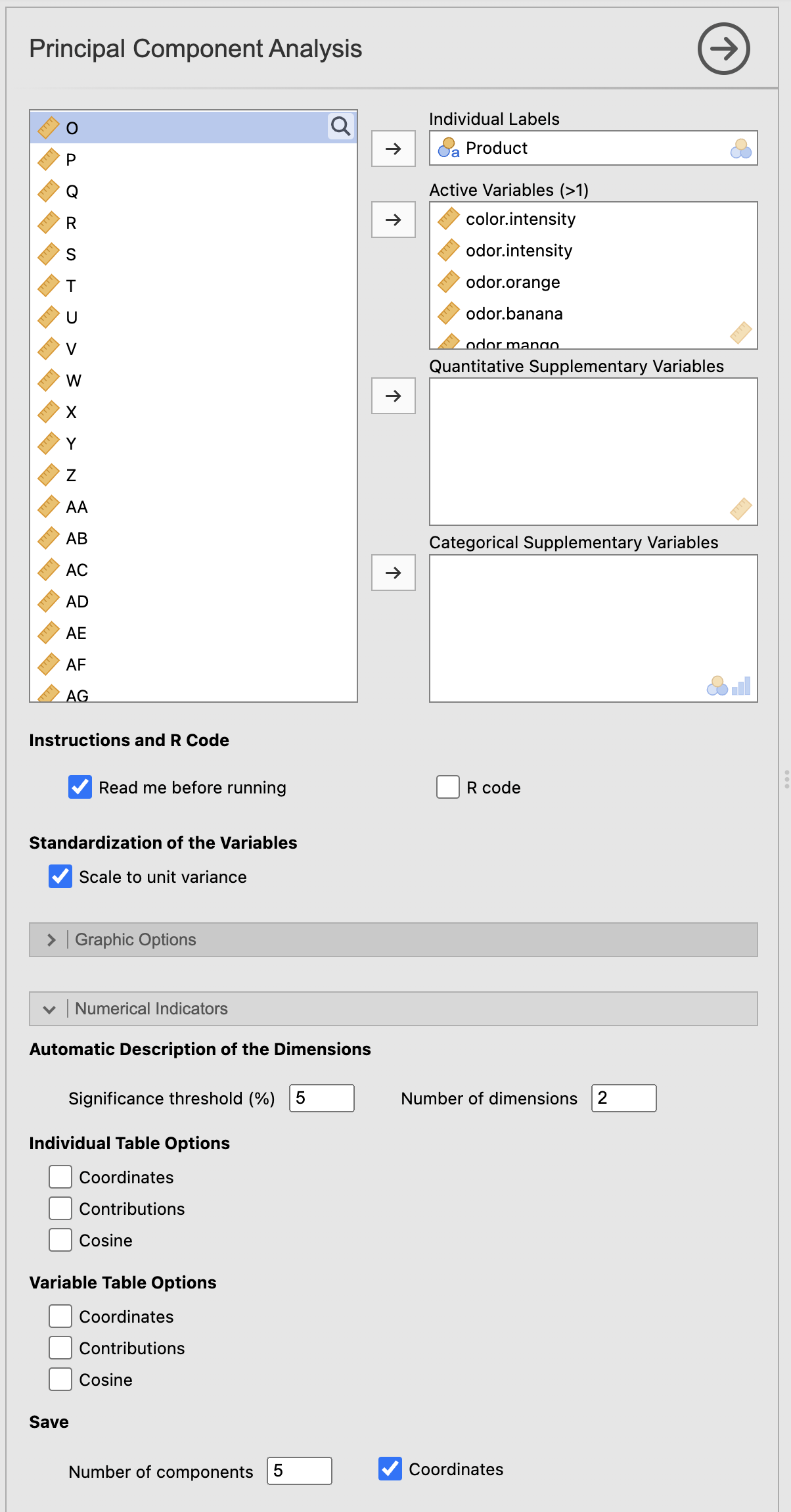
The PCA produces a two-dimensional space: Dim. 1 explains 53.25% of the variance and Dim. 2 explains 24.13%, that is, 77.37% cumulative. The 1/2 plane therefore summarises the sensory profiles of the cocktails well.
The automatic description of the dimensions confirms the interpretation of the axes:
- Dim. 1 opposes acidity (correlation 0.93), bitterness (0.88), odor.orange (0.75), and intensity (0.73) on one side, to odor.banana (-0.93), sweet (-0.93), thickness (-0.88), and pulp (-0.70) on the other. This is a clear opposition between acidic and intense cocktails vs sweet, thick, banana-like cocktails.
- Dim. 2 is more strongly structured by odor.lemon (0.77), odor.mango (0.69), persistence (0.66), and color.intensity (0.58), with odor.orange (-0.61) on the negative side.
On the individual map, the cocktails are widely distributed across the plane. 386 is located in the upper right (high on Dim. 2), 131 at the bottom centre, 447 and 312 on the left (sweet, thick), and 194, 233, and 245 on the right (acidic, intense). Once the PCA has been run, the Dim. 1 and Dim. 2 columns automatically appear in the jamovi data sheet.
8.7.3 Step 2 — Construct the preference map in SEDA
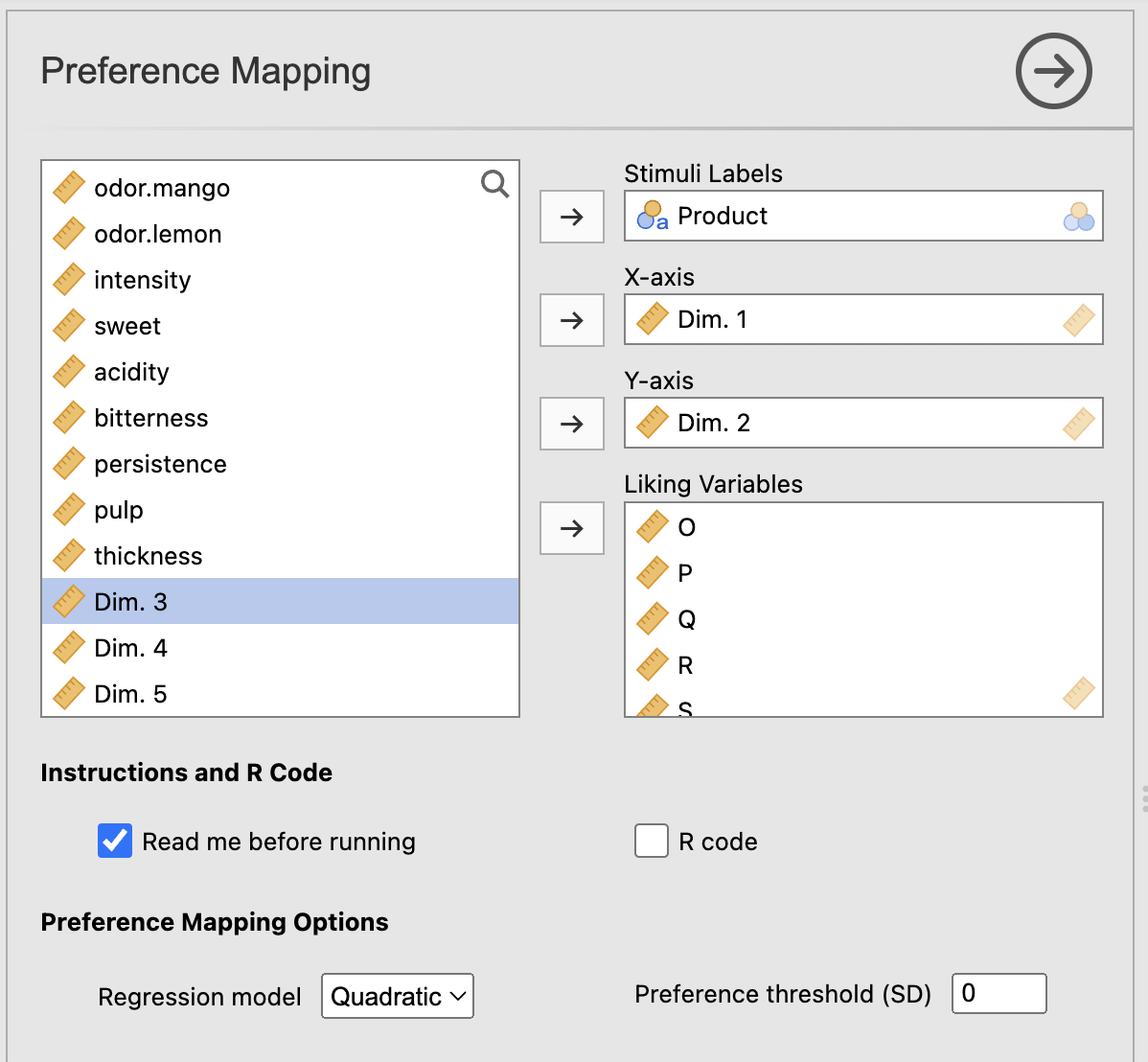
Return to SEDA > Hedonic Data > Preference Mapping and use the saved coordinates as X-axis and Y-axis. Select the hedonic columns in Liking Variables, keep Regression model = Quadratic, and use Preference threshold (SD) = 0.
To reproduce the segment-based reading as well, enable Classification of consumers, leave Number of clusters = -1, and keep Cluster dendrogram and Preference maps by cluster checked. Enabling classification does not change the overall map; it adds complementary results about consumer heterogeneity.
Figure 8.2 shows the Preference Mapping configuration in SEDA.
8.7.4 Analysis of the Overall Preference Map graph
Figure 8.3 shows the overall preference map.
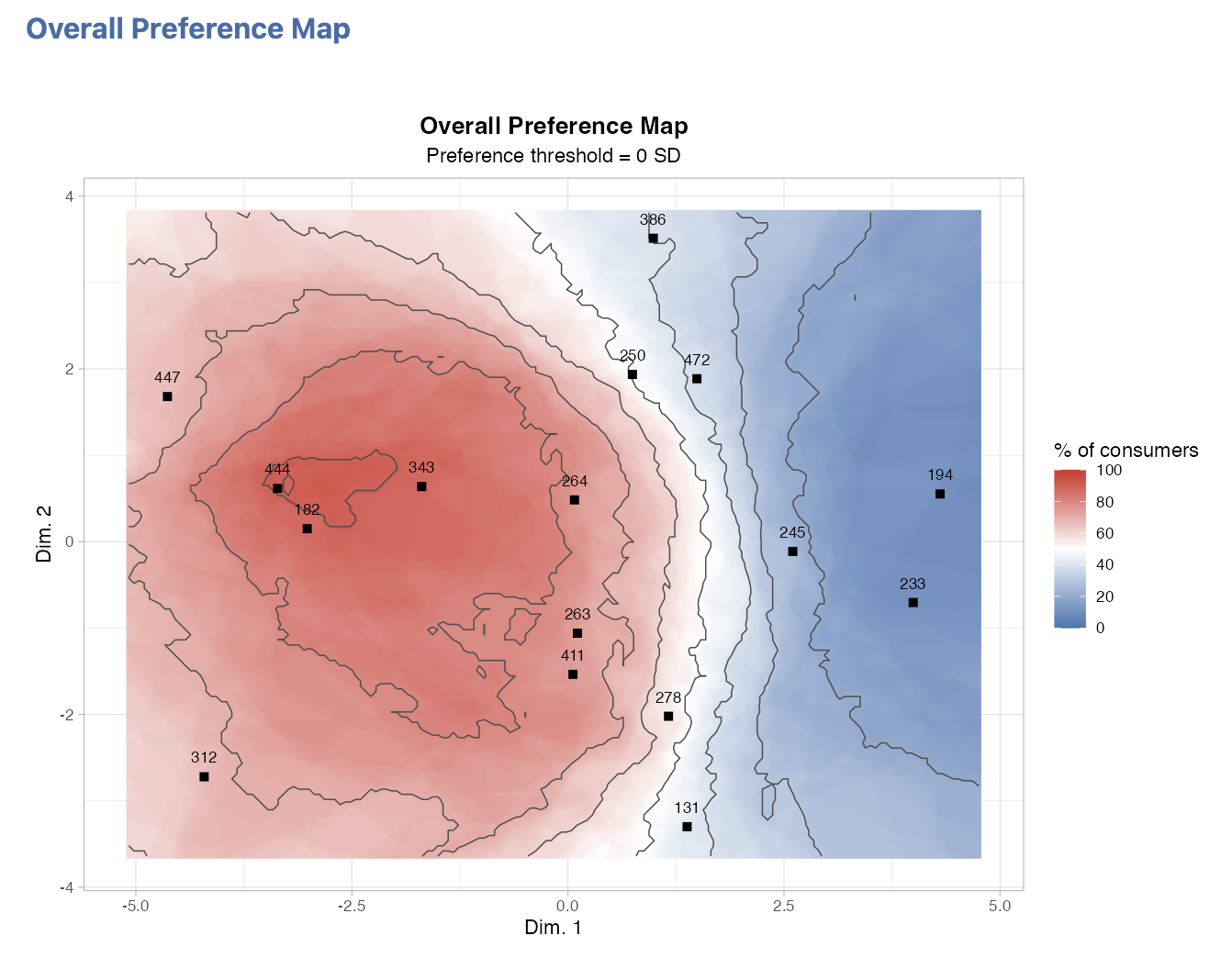
The resulting map superimposes the preference surface onto the position of the 16 cocktails in the sensory space. The dark red area — corresponding to more than 80–90% favourable consumers — is located on the left of the plane, in the region with negative coordinates on Dim. 1, where the cocktails 182, 444, 343, and 447 are located. These cocktails, characterised by sweeter, thicker, banana-like profiles, lie in a high-preference region.
Conversely, the blue area — corresponding to fewer than 20% favourable consumers — is located on the right of the plane, where the cocktails 194, 233, and 245 are located, characterised by acidic and intense profiles.
The cocktails 131 (bottom centre) and 386 (upper right) are located in intermediate to low-preference areas (light blue, 10–25%).
8.7.5 Reading the consumer classification
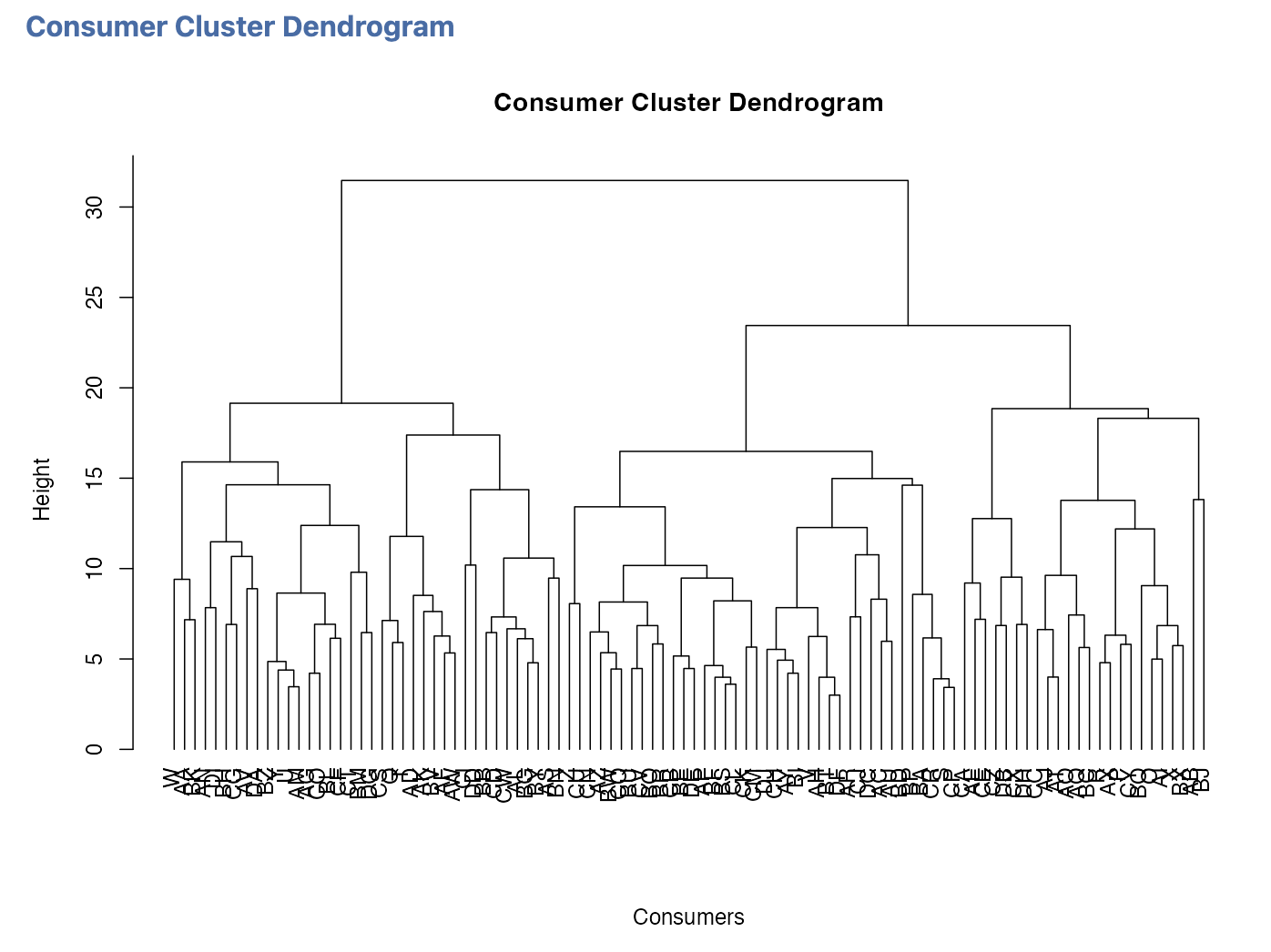
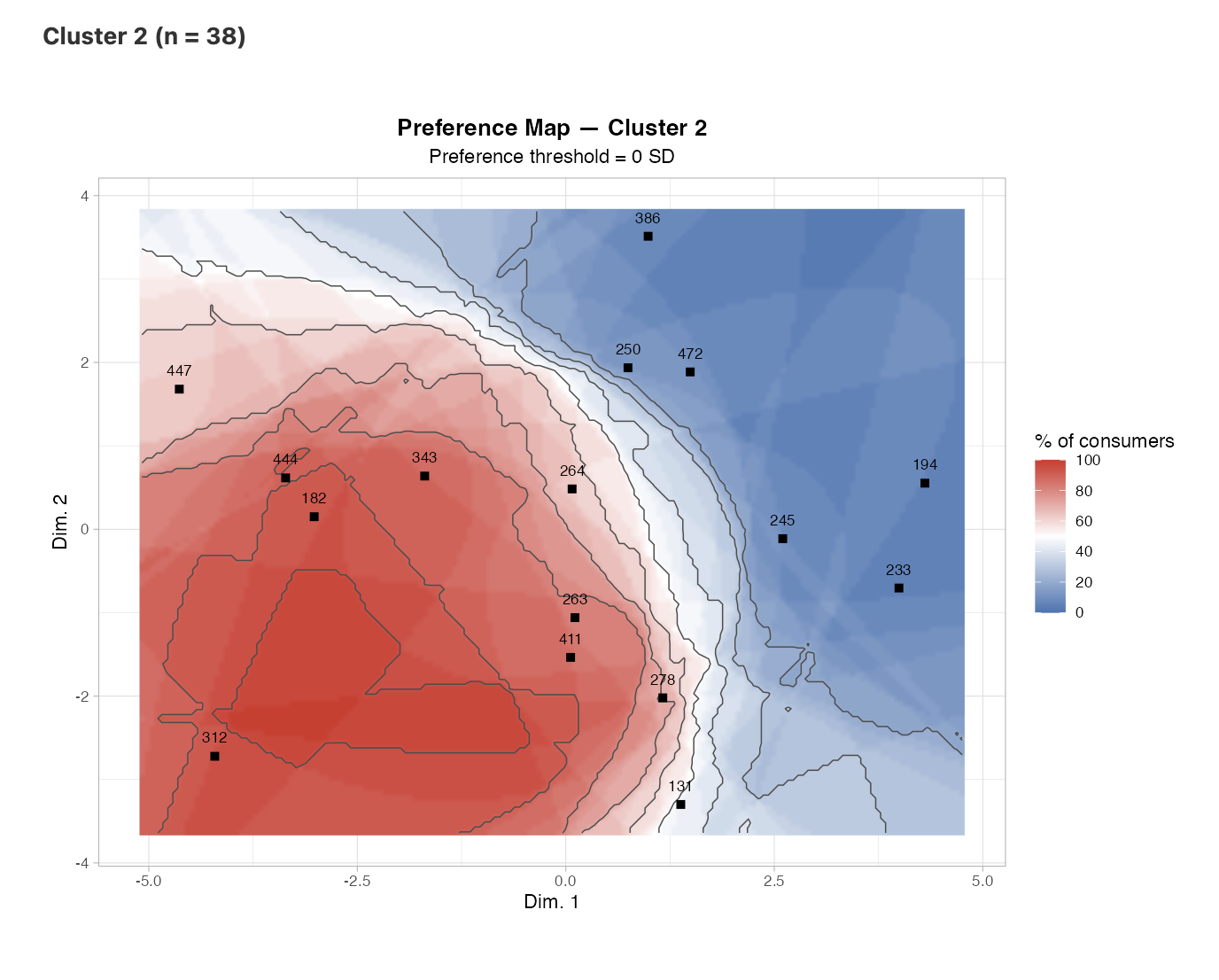
With Number of clusters = -1, the Ward classification applied to the centred liking profiles retains 2 consumer clusters in this example:
- Cluster 1: 62 consumers (62.0%). The products with the highest relative liking in the centred cluster profile are 182, 447, 472.
- Cluster 2: 38 consumers (38.0%). The products with the highest relative liking in the centred cluster profile are 343, 312, 182.
Product 182 appears among the highest relative liking values in both clusters, whereas 447/472 distinguish Cluster 1 and 343/312 distinguish Cluster 2 among the observed cocktails. This gives a concrete first indication of both shared and segment-specific preference patterns.
These short descriptions are based on the mean centred liking profile within each cluster. They identify which tested products most distinguish the relative preferences of a segment; they do not, by themselves, assign a sensory meaning to that segment.
Use Consumer Cluster Sizes to assess the weight of each segment and Consumer Cluster Membership to identify the consumers composing it. The Consumer Cluster Dendrogram shows the hierarchy underlying the partition.
Figure 8.4 shows the hierarchy of the consumer classification.
The Preference Maps by Consumer Cluster should then be compared in the common sensory space. Because every cluster map uses exactly the same product coordinates, regression model, and preference threshold as the overall map, differences between maps reflect heterogeneity in predicted preference patterns rather than a change of reference space. Very small clusters should nevertheless be interpreted cautiously.
Figure 8.5 shows the preference map for consumer cluster 1.
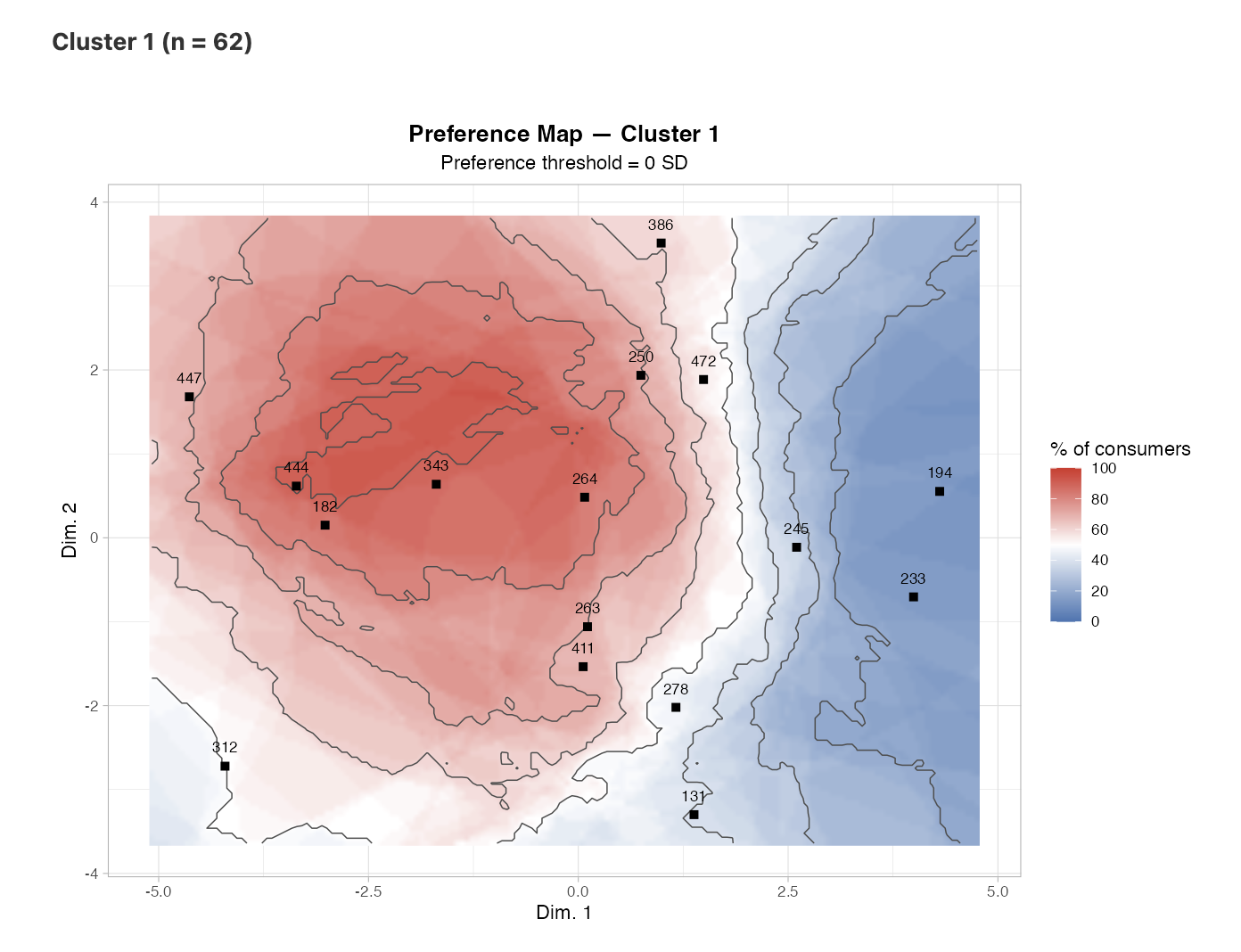
Figure 8.6 shows the preference map for consumer cluster 2.
8.7.6 Synthetic interpretation
The sensory space structured by the PCA, based on the acidic-intense vs sweet-thick opposition, is directly readable on the preference map. The highest-preference region lies on the sweet-thick side, whereas acidic and intense profiles are less appreciated. No cocktail appears to occupy the centre of this highest-preference region, which suggests a direction for formulation improvement rather than an already optimal product.
What we take away from this example: preference mapping directly links the sensory space and hedonic preferences, making it possible to identify a favourable region of the product space even when no existing product occupies its centre.
8.8 From jamovi to the Rj Editor
Once the Rj Editor has been configured with System R as described in Chapter 1, check R code to display the script corresponding to the analysis. The dataset open in jamovi is available as data.
The generated code reconstructs the two coordinates and liking columns, fits a separate response surface for each consumer, standardises predictions over the grid, and applies Preference threshold (SD) before computing the % of consumers. It therefore reproduces the logic of the map explicitly rather than treating the result as a simple mean liking score.
If Classification of consumers is enabled, the script also centres the liking profiles, computes distances between consumers, performs Ward clustering with hclust(..., method = "ward.D2"), uses cutree() to form the groups, and then recomputes a map for the consumers in each cluster. The generated code therefore reproduces both the overall map and the full segmentation in the Rj Editor.
8.9 Practical tips
- Always check that X-axis and Y-axis come from the same representation space and refer to the same stimuli as the liking scores.
- Use individual scores in Liking Variables, one column per consumer.
- Start with Preference threshold (SD) = 0; then vary it to assess whether high-preference regions remain stable.
- Match Regression model complexity to the number of products: the minima are 4, 5, 6, and 7 products for Vector, Circular, Elliptical, and Quadratic respectively.
- For external preference mapping, interpret the sensory axes before translating a favourable region into a formulation direction.
- If you enable Classification of consumers, inspect cluster sizes first and be cautious with very small segments.
- Compare cluster maps in the same reference space: differences reflect different preference structures, not different factorial spaces.
- Check R code when you want a reproducible record of the settings and calculations.
8.10 In summary
Preference mapping links a two-dimensional stimulus space to individual liking scores. SEDA fits a preference surface for each consumer, standardises the predictions, and represents the proportion of consumers exceeding Preference threshold (SD) in each region of the plane. The overall map can be complemented by Ward clustering of centred liking profiles and by cluster-specific preference maps. The analysis can therefore distinguish a broadly shared preference region from an overall pattern that hides several consumer segments, while keeping the same product space for all comparisons.